- Subscribe to RSS Feed
- Mark Topic as New
- Mark Topic as Read
- Float this Topic for Current User
- Bookmark
- Subscribe
- Mute
- Printer Friendly Page
cRIO System Configuration Information (CRI) Library

 Christian_L
06-25-2008
02:26 PM
- last edited on
06-16-2025
04:51 PM
by
 Content Cleaner
- Mark as New
- Bookmark
- Subscribe
- Mute
- Subscribe to RSS Feed
- Permalink
- Report to a Moderator
Christian L, CLA
Systems Engineering Manager - Automotive and Transportation
NI - Austin, TX

 StevenA
06-26-2008 11:38 AM
- Mark as New
- Bookmark
- Subscribe
- Mute
- Subscribe to RSS Feed
- Permalink
- Report to a Moderator
CLD
-------------------------------------
FPGA/RT/PDA/TP/DSC
-------------------------------------

 JoeC
JoeC
02-24-2009 08:05 PM
- Mark as New
- Bookmark
- Subscribe
- Mute
- Subscribe to RSS Feed
- Permalink
- Report to a Moderator
In the Dynamic FPGA Code Selection section of the document, the paragraph states, "Using the CRI component you can detect the current configuration of modules in the backplane and can then select the proper FPGA bitstream to download and run. This detection and selection of the FPGA bitstream will be part of LabVIEW Real-Time application running on the cRIO controller."
How do you programmatically pick an PFGA bitstream to download? Is there a function in the CRI library that does this?
Thanks,
Joe
02-25-2009 02:43 PM
- Mark as New
- Bookmark
- Subscribe
- Mute
- Subscribe to RSS Feed
- Permalink
- Report to a Moderator
No. Currently you need to include a separate Open FPGA VI Reference node for each FPGA VI/bitstream that you want to run and then select the appropriate node using normal LV programming such as a Case structure.
Christian L, CLA
Systems Engineering Manager - Automotive and Transportation
NI - Austin, TX
JoeC
02-26-2009 12:16 PM
- Mark as New
- Bookmark
- Subscribe
- Mute
- Subscribe to RSS Feed
- Permalink
- Report to a Moderator
Thanks for the reply. Please allow me to post an theoretical example to see if I understand what you are saying.
Let's say I have a 9205 cRIO module in a 4 slot 9013 backplane. If I wanted to have an application that detected which slot the 9205 is plugged in, I would create 4 different FPGA VIs that were configured for each to have the 9205 in each slot.
I would then use the CRI tools to detect which slot the module is located in. I would then have in my controller application, a case statement with 4 different "Open FPGA VI Reference Function" that will call each of the slot configured FPGA VIs. I assume it is at this time that when an Open FPGA VI Reference Function is called that the bitstream is loaded?
Thanks again for your clarifications...
Joe
03-06-2009 01:28 PM
- Mark as New
- Bookmark
- Subscribe
- Mute
- Subscribe to RSS Feed
- Permalink
- Report to a Moderator
JoeC wrote:Thanks for the reply. Please allow me to post an theoretical example to see if I understand what you are saying.
Exactly correct.
Christian L, CLA
Systems Engineering Manager - Automotive and Transportation
NI - Austin, TX

 RayKF
RayKF
11-30-2009 12:40 AM
- Mark as New
- Bookmark
- Subscribe
- Mute
- Subscribe to RSS Feed
- Permalink
- Report to a Moderator
Hi,
Does this tool work for R-Series (78xx) cards? Or do you have a separate tool / VIs for the R-series?
Cheers,
-Ray
12-16-2009 11:58 AM
- Mark as New
- Bookmark
- Subscribe
- Mute
- Subscribe to RSS Feed
- Permalink
- Report to a Moderator
This tool should work for any PCI/PXI-based R series devices as well, but you will need to add the R series cards as additional backplanes in cri_cRIO Vendor and Components Library.vi which is a VI used to define all of the device IDs that the CRI tool knows about.
This tool will not work for PCIe/PXIe-based boards and devices such as the PCIe-785xR cards.
Device IDs for some R series devices:
PCI-7811R: 0x702F
PXI-7811R: 0x702E
PCI-7813R: 0x7194
PXI-7813R: 0x7193
PCI-7830R: 0x7056
PXI-7830R: 0x7055
PCI-7831R: 0x702D
PXI-7831R: 0x702C
PCI-7833R: 0x7083
PXI-7833R: 0x7074
PCI-7841R: 0x7393
PXI-7841R: 0x7390
PCI-7842R: 0x7394
PXI-7842R: 0x7391
PCI-7851R: 0x7386
PXI-7851R: 0x7384
PCI-7852R: 0x7387
PXI-7852R: 0x7385
PCI-7853R: 0x7395
PXI-7853R: 0x7392
PXI-7854R: 0x73E1
Christian L, CLA
Systems Engineering Manager - Automotive and Transportation
NI - Austin, TX
 TylerDurden
10-05-2010 01:36 AM
- Mark as New
- Bookmark
- Subscribe
- Mute
- Subscribe to RSS Feed
- Permalink
- Report to a Moderator
Hey,
very great set of VIs. We are using these features in a component on our cRIOs. These VIs work with LV8.6.1 and LV2009SP1 very good, but on LV2010 the VI cri_RT Ping Controllers.vi is broken and the VI itself is password-protected. Is there an update for the CRI component or how can we fix this to support our applications with LabVIEW 2010.
Thanks for your replies.
Tyler
10-05-2010 01:56 PM
- Mark as New
- Bookmark
- Subscribe
- Mute
- Subscribe to RSS Feed
- Permalink
- Report to a Moderator
@TylerDurden wrote:In LV2010 the VI cri_RT Ping Controllers.vi is broken and the VI itself is password-protected. Is there an update for the CRI component or how can we fix this to support our applications with LabVIEW 2010.
Attached is an updated copy of this VI.
Christian L, CLA
Systems Engineering Manager - Automotive and Transportation
NI - Austin, TX
 Terje
Terje
01-06-2011 08:20 AM
- Mark as New
- Bookmark
- Subscribe
- Mute
- Subscribe to RSS Feed
- Permalink
- Report to a Moderator
These are greater VI and I use them a lot.
Now I have a cRIO with a 9111 backplane which does not seem to be supported by these Vis.
Will they be updated?
Terje
01-07-2011 10:01 AM - edited 02-10-2011 09:17 AM
- Mark as New
- Bookmark
- Subscribe
- Mute
- Subscribe to RSS Feed
- Permalink
- Report to a Moderator
I have attached updated versions of two files which contain all of the model codes for the controllers, backplanes and modules. Please copy these files to your harddrive, replacing the files that are currently there.
cri_cRIO Vendor and Components Library.vi >> ..\LabVIEW xxxx\user.lib\CRI\_subVIs
cri_cRIO Backplanes.ctl >> ..\LabVIEW xxxx\user.lib\CRI\_subVIs\TypeDefs
These files are used to lookup and convert the model code read from the HW to the corresponding controller, backplane or module name. If you have a newer piece of HW which is not listed, you can update these files yourself. By looking at the outputs of the CRI subVIs you will be able to see the model code for your new hardware.
[2/10/2011] Update: The files on the DevZone docment have been updated to the latest version.
Christian L, CLA
Systems Engineering Manager - Automotive and Transportation
NI - Austin, TX
Terje
01-07-2011 12:23 PM
- Mark as New
- Bookmark
- Subscribe
- Mute
- Subscribe to RSS Feed
- Permalink
- Report to a Moderator
Thanks Christian
I now get the correct information about the backplane, but I don’t get the information about the connected modules which is what I really need. It seems that I need a bitfile for that specific backplane in the CRI Get cRIO Modules Info.vi. If it is possible to get an updated version of these VIs as well, I would really appreciate it.
Terje
01-17-2011 03:02 PM - edited 02-09-2011 03:11 PM
- Mark as New
- Bookmark
- Subscribe
- Mute
- Subscribe to RSS Feed
- Permalink
- Report to a Moderator
I have added two new attachments to the original document on DevZone containing the complete updated version of CRI.
Christian L, CLA
Systems Engineering Manager - Automotive and Transportation
NI - Austin, TX
Terje
02-08-2011 08:45 AM
- Mark as New
- Bookmark
- Subscribe
- Mute
- Subscribe to RSS Feed
- Permalink
- Report to a Moderator
Thanks for the update Christian.
However, I still don’t get any information about the modules when using a 9111 backplane
Terje
02-09-2011 03:13 PM
- Mark as New
- Bookmark
- Subscribe
- Mute
- Subscribe to RSS Feed
- Permalink
- Report to a Moderator
I updated the attachments on the document one more time. Previously I had only updated the CRI Get Remote cRIO Modules Info.vi and forgot to update the local version of the same function.
I also created separate installers for LabVIEW 2009 and LabVIEW 2010 to account for the difference in the RT Ping function.
Christian L, CLA
Systems Engineering Manager - Automotive and Transportation
NI - Austin, TX
Fro2
07-27-2011 12:59 PM
- Mark as New
- Bookmark
- Subscribe
- Mute
- Subscribe to RSS Feed
- Permalink
- Report to a Moderator
FYI: Even though you have fixed the subVIs to support the additional backplanes and have the bit files in the installer package. The text on the website still state that only the 9101, 9102, 9103, 9104, 9072, and 9074 backplanes are supported. I installed the CRI package from the LV2010 VIP file and noticed that it does not have the change you made within the “CRI Get Remote cRIO Modules Info” file. Not supporting the additional backplanes. Therefore I downloaded the zip file and overwrote the VI which the VIP installed with the one from the zip file.

02-05-2012 07:07 AM
- Mark as New
- Bookmark
- Subscribe
- Mute
- Subscribe to RSS Feed
- Permalink
- Report to a Moderator
Hello,
I want to use function CRI Get cRIO Modules Info.vi. In control on Front panel of this VI I can choose for example sbRIO-9602,
but in block diagram I see that there is not case which will call proper subVI (e.g bit file). So, is it possible to get support for sbRIO components for reading information about modules?
(I am interested for sbRIO 9602 most)
P.S. Kudos for library
Regards,
Sofija
02-08-2012 11:17 AM
- Mark as New
- Bookmark
- Subscribe
- Mute
- Subscribe to RSS Feed
- Permalink
- Report to a Moderator
Sofija,
I'm working on an update of the CRI to include support for recent cRIO and sbRIO additions. I should be able to post a 'beta' version in a couple of days. Can you describe your application in a little bit and how you use CRI in a sbRIO-based application. In the past we have not planned on adding sbRIO support to CRI as we see sbRIO to be used in static applications in regards to HW - we don't expect users to change the HW configuration of sbRIO systems at run-time.
Christian L, CLA
Systems Engineering Manager - Automotive and Transportation
NI - Austin, TX
02-10-2012 02:32 AM
- Mark as New
- Bookmark
- Subscribe
- Mute
- Subscribe to RSS Feed
- Permalink
- Report to a Moderator
Hello Christian.
Thanks for update.
I am supporting one customer, who si using sbRIO, and idea of his application is to one of the three slots on 9602 to cover several HW/SW options by
inserting various modules. They wish that the RT recognizes the module and selects the appropriate FPGA bit file. So, acquisition of different type of signals
and processing of those based on module which is required is main idea.
Sofija Poledica
AE Eastern Europe
02-10-2012 10:37 AM
- Mark as New
- Bookmark
- Subscribe
- Mute
- Subscribe to RSS Feed
- Permalink
- Report to a Moderator
CRI Library 1.2 Beta
Attached is a beta release of the 1.2 version of CRI. The attached ZIP contains the files to be placed into ..\LabVIEW 2010\user.lib\cri
http://ftp.ni.com/pub/devzone/epd/ni_lib_cri_lv2010-1.2.beta1.zip
This version will work in LV 2010 or newer. It supports the following hardware.
Controllers:
cRIO-9002/9004 cRIO-9012 cRIO-9014 cRIO-9022/3 cRIO-9024/5 cRIO-9072 cRIO-9073 cRIO-9074 cRIO-9075 cRIO-9076 sbRIO-9601 sbRIO-9602 sbRIO-9611 sbRIO-9612 sbRIO-9631 sbRIO-9632 sbRIO-9641 sbRIO-9642
Backplanes:
cRIO-9072 cRIO-9073 cRIO-9074 cRIO-9075 cRIO-9076 cRIO-9101 cRIO-9102 cRIO-9103 cRIO-9104 cRIO-9111 cRIO-9112 cRIO-9112 cRIO-9113 cRIO-9114 cRIO-9116 cRIO-9118 sbRIO-9601 sbRIO-9602 sbRIO-9611 sbRIO-9612 sbRIO-9631 sbRIO-9632 sbRIO-9641 sbRIO-9642
Modules:
NI 9201 NI 9201 NI 9203 NI 9205 NI 9205 NI 9206 NI 9207 NI 9207 NI 9208 NI 9208 NI 9211 NI 9213 NI 9214 NI 9215 NI 9215 NI 9217 NI 9219 NI 9221 NI 9221 NI 9222 NI 9223 NI 9225 NI 9227 NI 9229 NI 9232 NI 9233 NI 9234 NI 9235 NI 9236 NI 9237 NI 9239 NI 9263 NI 9264 NI 9265 NI 9269 NI 9401 NI 9402 NI 9403 NI 9411 NI 9421 NI 9421 NI 9422 NI 9423 NI 9425 NI 9426 NI 9435 NI 9472 NI 9472 NI 9474 NI 9475 NI 9476 NI 9477 NI 9478 NI 9481 NI 9485 NI 9501 NI 9505 NI 9512 NI 9514 NI 9516 NI 9795 NI 9802 NI 9852 NI 9853 NI 9870 NI 9871
Christian L, CLA
Systems Engineering Manager - Automotive and Transportation
NI - Austin, TX

 Franjo_Tonkovic
02-24-2012 01:07 AM
- Mark as New
- Bookmark
- Subscribe
- Mute
- Subscribe to RSS Feed
- Permalink
- Report to a Moderator
Hi all,
Short feedback...
I was trying to use beta version of CRI which supports sbRIO-9602 and it works fine.
I just had problem with detecting module NI-9215. I have 2 modules NI-9215 and both of them have ID: "1093740D" and that ID wasnt defined in the module library! I fixed the problem with small modification of module IDs library.
It would be great if someone could do the update in public version as well.
Once more thanks for offering CRI support for all cRIOs/sbRIOs!
Regards
Franjo
04-03-2012 05:27 PM
- Mark as New
- Bookmark
- Subscribe
- Mute
- Subscribe to RSS Feed
- Permalink
- Report to a Moderator
Franjo,
Thank you for the feedback. I have made the change in the module library and it will be included in the next distribution.
Christian L, CLA
Systems Engineering Manager - Automotive and Transportation
NI - Austin, TX
jka
05-10-2012 03:00 AM
- Mark as New
- Bookmark
- Subscribe
- Mute
- Subscribe to RSS Feed
- Permalink
- Report to a Moderator
Hello !
I test this beta program with cRIO-9076 controller. Function, cri_Get Backplace Data.vi, gives Module Code x7527 to that controller. In, cri_cRIO Vendor and Components Library.vi, this Backplace ID x7527 means cRIO-9075 controller, but my controller is cRIO-9076.
05-21-2012 10:02 AM
- Mark as New
- Bookmark
- Subscribe
- Mute
- Subscribe to RSS Feed
- Permalink
- Report to a Moderator
jka,
Thank you for the note. You are correct. The model code for the backplanes was reversed between the 9075 and 9076 devices.
Both devices share the same controller code 0x7527. The 9075 backplane model code is 0x7573. The 9076 backplane model code is 0x7527.
I have updated the Library VI and attached it here.
Christian L, CLA
Systems Engineering Manager - Automotive and Transportation
NI - Austin, TX
 dfrederickson
05-21-2012 02:36 PM
- Mark as New
- Bookmark
- Subscribe
- Mute
- Subscribe to RSS Feed
- Permalink
- Report to a Moderator
Is there an update for the cRIO-9082 and NI 9159?
06-01-2012 04:38 PM
- Mark as New
- Bookmark
- Subscribe
- Mute
- Subscribe to RSS Feed
- Permalink
- Report to a Moderator
CRI Library for LabVIEW 2011 v1.3 Beta 1
Attached is a beta release of the 1.3 version of CRI for LabVIEW 2011. The attached ZIP contains the files to be placed into ..\LabVIEW 2011\user.lib\cri
This version contains added support for the cRIO-908x controllers and NI 9157 and 9159 MXI Expansion Chassis. Due to added support for expansion chassis on the cRIO platform, some of the VIs in this version are not directly compatible with previous versions. If you are upgrading an application using CRI VIs from a previous version you will need to make some manual changes in your application code.
http://ftp.ni.com/pub/devzone/epd/ni_lib_cri_2011-1.3.b1.zip
This version will work in LV 2011 or newer. It supports the following hardware.
Controllers:
cRIO-9002/9004 cRIO-9012 cRIO-9014 cRIO-9022/3 cRIO-9024/5 cRIO-9072 cRIO-9073 cRIO-9074 cRIO-9075/6 cRIO-9081/2 sbRIO-9601 sbRIO-9602 sbRIO-9605/6 sbRIO-9611 sbRIO-9612 sbRIO-9631 sbRIO-9632 sbRIO-9641 sbRIO-9642
Backplanes:
NI-9157 NI-9159 cRIO-9072 cRIO-9073 cRIO-9074 cRIO-9075 cRIO-9076 cRIO-9081 cRIO-9082 cRIO-9101 cRIO-9102 cRIO-9103 cRIO-9104 cRIO-9111 cRIO-9112 cRIO-9113 cRIO-9114 cRIO-9116 cRIO-9118 sbRIO-9601 sbRIO-9602 sbRIO-9605 sbRIO-9606 sbRIO-9611 sbRIO-9612 sbRIO-9631 sbRIO-9632 sbRIO-9641 sbRIO-9642
Modules:
NI 9201 NI 9201 NI 9203 NI 9205 NI 9205 NI 9206 NI 9207 NI 9207 NI 9208 NI 9208 NI 9211 NI 9213 NI 9214 NI 9215 NI 9215 NI 9215E NI 9215E NI 9217 NI 9219 NI 9221 NI 9221 NI 9222 NI 9223 NI 9225 NI 9227 NI 9229 NI 9232 NI 9233 NI 9234 NI 9235 NI 9236 NI 9237 NI 9239 NI 9263 NI 9264 NI 9265 NI 9269 NI 9401 NI 9402 NI 9403 NI 9411 NI 9421 NI 9421 NI 9422 NI 9423 NI 9425 NI 9426 NI 9435 NI 9472 NI 9472 NI 9474 NI 9475 NI 9476 NI 9477 NI 9478 NI 9481 NI 9485 NI 9501 NI 9505 NI 9512 NI 9514 NI 9516 NI 9795 NI 9802 NI 9852 NI 9853 NI 9870 NI 9871
Christian L, CLA
Systems Engineering Manager - Automotive and Transportation
NI - Austin, TX
dfrederickson
06-18-2012 01:57 PM
- Mark as New
- Bookmark
- Subscribe
- Mute
- Subscribe to RSS Feed
- Permalink
- Report to a Moderator
The vi can read my 9159 chassis just fine, but the 9082 modules cannot be detected using either example. The error out code is -61201.
06-19-2012 10:10 AM
- Mark as New
- Bookmark
- Subscribe
- Mute
- Subscribe to RSS Feed
- Permalink
- Report to a Moderator
This error means that the 9082 chassis is currently configured for ScanEngine mode. The CRI functions require that the chassis is in FPGA mode. You can change the mode of the chassis in the LV project using the properties of the chassis. After changing the properties, you need to deploy those changes to the chassis.
I'm looking into how we can make this change programmatically so that this can be embedded in a deployable application.

Christian L, CLA
Systems Engineering Manager - Automotive and Transportation
NI - Austin, TX
 Neville_D
08-26-2013 06:18 PM
- Mark as New
- Bookmark
- Subscribe
- Mute
- Subscribe to RSS Feed
- Permalink
- Report to a Moderator
Hi Christian,
trying to use the CRI library with LV 2013 RT and cRIO 9012, 9014, 9025 and 9068. CRI Get cRIO Controller Info.vi is broken.
Specifically cri_RT Ping Controllers.vi.
Is there a fix for this? When is the new version of the library for 2013 going to be released? What is the workaround?
thanks,
Neville.
08-27-2013 08:50 AM
- Mark as New
- Bookmark
- Subscribe
- Mute
- Subscribe to RSS Feed
- Permalink
- Report to a Moderator
Neville,
I tested those VIs in LV 2013 here and they work as intended.
Please confirm that you have both the LabVIEW Real-Time module as well as the new NI-RIO driver installed. In the NI-RIO installer you need to select cRIO support, as well as LabVIEW 2013 support.
The VI in questions calls a number of VIs in the follwing LLB. Please check to see if this is present on your system.
C:\Program Files (x86)\National Instruments\LabVIEW 2013\vi.lib\real-time\rtutility.llb
Christian L, CLA
Systems Engineering Manager - Automotive and Transportation
NI - Austin, TX
Neville_D
08-27-2013 10:23 AM
- Mark as New
- Bookmark
- Subscribe
- Mute
- Subscribe to RSS Feed
- Permalink
- Report to a Moderator
I downloaded LV 2013 components separately from the website. Maybe some components didn't get installed.
I am currently downloading the platform DVD's but it will take awhile..
I do have VI's in the rtutility folder and when I tried to drag that particular VI in to fix the issue, it shows up with a red "11.0" displayed on it, but then it gets automatically removed. I have LV 2011 installed.
Let me try a fresh install and see if that is fixed.
Thanks.
N.
Neville_D
08-28-2013 03:29 PM
- Mark as New
- Bookmark
- Subscribe
- Mute
- Subscribe to RSS Feed
- Permalink
- Report to a Moderator
OK, I downloaded all 25 GB of the Developers Suite DVD's and installed from there.
The cri_RT Ping Controllers.vi is still broken.
Also, the RT Set Date and Time.vi from the rtutility.llb folder has a RED "2011" on it. I don't know if it will work (haven't got a chance to try it yet with the other things broken).
What exactly am I supposed to load and from where?
N.
08-29-2013 09:05 AM
- Mark as New
- Bookmark
- Subscribe
- Mute
- Subscribe to RSS Feed
- Permalink
- Report to a Moderator
N.,
Can you clarify which specific version of CRI you are installing. From where are you getting the installer/package? There was a change in the RT utility VIs a while back and so there are two different versions of CRI, one for LV 8.5/2009, and one for LV 2010 and later. I just want to make sure you are using the later version.
In the RT Utilities, please let me know if you have these specific VIs and if they are not broken.
C:\Program Files (x86)\National Instruments\LabVIEW 2013\vi.lib\real-time\rtutility.llb\FPC open connection.vi
C:\Program Files (x86)\National Instruments\LabVIEW 2013\vi.lib\real-time\rtutility.llb\FPC Discover systems.vi
C:\Program Files (x86)\National Instruments\LabVIEW 2013\vi.lib\real-time\rtutility.llb\FPC Query systems.vi
C:\Program Files (x86)\National Instruments\LabVIEW 2013\vi.lib\real-time\rtutility.llb\FPC parse system info.vi
C:\Program Files (x86)\National Instruments\LabVIEW 2013\vi.lib\real-time\rtutility.llb\FPC close connection.vi
The RT utility VIs with the red 2011 on the icon are okay. They are compatibility VIs that we started shipping to allow older code like CRI to continue working. The functionality of the RT utility VIs has been moved in the System Configuration API which should be used for new development using these features.
For reference I have included a partial VI hierarchy for CRI in LV 2013.
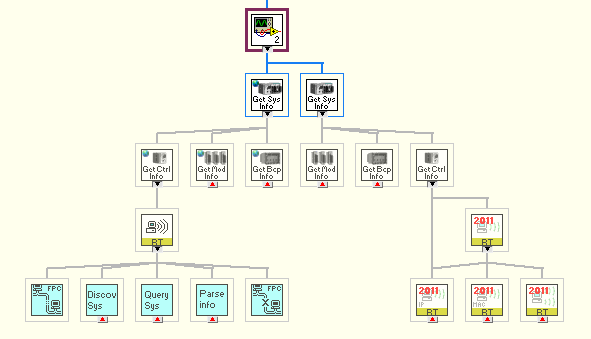
Christian L, CLA
Systems Engineering Manager - Automotive and Transportation
NI - Austin, TX
Neville_D
08-29-2013 12:45 PM
- Mark as New
- Bookmark
- Subscribe
- Mute
- Subscribe to RSS Feed
- Permalink
- Report to a Moderator
All the VI's you refer to are not broken in 2013.
I downloaded the CRI library version 2010 1.1.1.0 and that seems to be not broken any more. I haven't checked functionality, but at least its not broken.
What is the current recommended library to use with LV 2013 from the CRI page? There is also LV 2010 v1.2 Beta. What is Beta about it?
08-30-2013 09:18 AM
- Mark as New
- Bookmark
- Subscribe
- Mute
- Subscribe to RSS Feed
- Permalink
- Report to a Moderator
We are in the process of moving the code distribution for this library as well as other components, libraries, and reference designs to the LabVIEW Tools Network (LVTN) repository, which can be accessed using VI Package Manager (VIPM). VIPM is installed with LabVIEW 2013.
LVTN currently contains two different versions of CRI:
- the older pre 2010 version labeled 'Reference Library for reading cRIO System Configuration Information v1.0.0.4'
- the newer 2010 and later version labeled 'CompactRIO Information Library v1.1.1.0'
You can filter the packages in VIPM by entering a search term such as 'CRI' in the search field on the top right of the UI. I recommend you install CRI from LVTN using VIPM unless you need any of the updates listed below. I will work on moving these updates into LVTN in the next few weeks.
Updates on the CRI Developer Zone page:
ni_lib_cri_lv2010-1.2.beta1.zip contains a beta version of the next CRI release with added support for newer cRIO controllers, backplanes, and modules. The list of supported hardware is provided in the discussion forum for the CRI library.
ni_lib_cri_2011-1.3.b1.zip contains a beta version of the next CRI release for LabVIEW 2011 with added support for newer cRIO controllers, backplanes, and modules. The list of supported hardware is provided in the discussion forum for the CRI library. Due to added support for expansion chassis on the cRIO platform, some of the VIs in this version are not compatible with previous versions. If you are upgrading an application using a previous version of CRI you will need to make some manual changes in your application code.
Christian L, CLA
Systems Engineering Manager - Automotive and Transportation
NI - Austin, TX
 srm@viewpointus
10-17-2013 08:54 PM
- Mark as New
- Bookmark
- Subscribe
- Mute
- Subscribe to RSS Feed
- Permalink
- Report to a Moderator
any update on when this latest version will make to the tools network?
Thanks
Stu
10-28-2013 02:30 PM
- Mark as New
- Bookmark
- Subscribe
- Mute
- Subscribe to RSS Feed
- Permalink
- Report to a Moderator
Hello Stu,
Here is a release candidate for the next version of CRI. If we (or you) do not find any issues with this package, we will pubish it on the LVTN repository.
http://ftp.ni.com/pub/devzone/epd/ni_lib_cri-2.0.1.2.vip
Description:
NI CompactRIO Information (CRI) Library v2.0.1.1 by National Instruments
Author: Systems Engineering
Copyright: Copyright (c) 2013, National Instruments
License: NI SCL
Compatible LabVIEW Versions: >= 2011.
Compatible OS Versions: Windows.
Description:
The development of advanced and dynamic CompactRIO (cRIO) applications sometimes requires the ability to detect the current configuration of a CompactRIO system. The cRIO Information (CRI) component provides VIs to retrieve information about a local or remote cRIO controller, backplane, and modules including the type and serial number of each of these system components.
The following devices are supported:
Controllers
cRIO-9002/9004, cRIO-9012, cRIO-9014, cRIO-9022/3, cRIO-9024/5, cRIO-9072, cRIO-9073, cRIO-9074, cRIO-9075/6, cRIO-9081/2, sbRIO-9601, sbRIO-9602, sbRIO-9605/6, sbRIO-9611, sbRIO-9612, sbRIO-9631, sbRIO-9632, sbRIO-9641, sbRIO-9642
Backplanes
NI-9157, NI-9159, cRIO-9072, cRIO-9073, cRIO-9074, cRIO-9075, cRIO-9076, cRIO-9081, cRIO-9082, cRIO-9101, cRIO-9102, cRIO-9103, cRIO-9104, cRIO-9111, cRIO-9112, cRIO-9113, cRIO-9114, cRIO-9116, cRIO-9118, sbRIO-9601, sbRIO-9602, sbRIO-9605, sbRIO-9606, sbRIO-9611, sbRIO-9612, sbRIO-9631, sbRIO-9632, sbRIO-9641, sbRIO-9642
Modules
NI 9201, NI 9201 DSUB, NI 9201E, NI 9201E DSUB, NI 9203, NI 9203E, NI 9205, NI 9205 DSUB, NI 9205E, NI 9206, NI 9207, NI 9207 DSUB, NI 9207E DSUB, NI 9208, NI 9208 DSUB, NI 9208E, NI 9208E DSUB, NI 9211, NI 9211E, NI 9213, NI 9213E, NI 9214, NI 9214, NI 9215, NI 9215 BNC, NI 9215E, NI 9215E BNC, NI 9217, NI 9219, NI 9219 LEMO, NI 9219E, NI 9220, NI 9220 DSUB, NI 9220E, NI 9221, NI 9221 DSUB, NI 9221E, NI 9221E DSUB, NI 9222, NI 9222 BNC, NI 9222E, NI 9223, NI 9223 BNC, NI 9223E, NI 9225, NI 9225E, NI 9227, NI 9227E, NI 9229, NI 9229 BNC, NI 9229E, NI 9232, NI 9232E, NI 9233, NI 9234, NI 9234, NI 9234E, NI 9235, NI 9235E, NI 9236, NI 9236E, NI 9237, NI 9237 DSUB, NI 9237E, NI 9237E DSUB, NI 9239, NI 9239 BNC, NI 9239E, NI 9263, NI 9263 BNC, NI 9263E, NI 9264, NI 9264 DSUB, NI 9264E, NI 9264E DSUB, NI 9265, NI 9265E, NI 9269, NI 9269E, NI 9375, NI 9375 DSUB, NI 9375E, NI 9375E DSUB, NI 9381, NI 9381 DSUB, NI 9401, NI 9402, NI 9403, NI 9403E, NI 9411, NI 9421, NI 9421 DSUB, NI 9422, NI 9423, NI 9425, NI 9426, NI 9426E, NI 9435, NI 9467, NI 9469, NI 9472, NI 9472 DSUB, NI 9474, NI 9475, NI 9476, NI 9477, NI 9478, NI 9478E, NI 9481, NI 9481E, NI 9485, NI 9501, NI 9501E, NI 9502, NI 9502E, NI 9505, NI 9505E, NI 9512, NI 9514, NI 9516, NI 9795, NI 9802, NI 9852, NI 9853, NI 9861, NI 9862, NI 9866, NI 9870, NI 9870E, NI 9871, NI 9871E, NI 9881, NI 9882, NI 9882
Release Notes:
Added support for the CompactRIO-908x controllers and NI 9157 and 9159 MXI Expansion Chassis. Due to added support for expansion chassis on the cRIO platform, some of the VIs in this version are not compatible with previous versions. If you are upgrading an application using CRI VIs from a previous version you will need to make some manual changes in your application code to accomodate these changes.
Christian L, CLA
Systems Engineering Manager - Automotive and Transportation
NI - Austin, TX
Neville_D
12-27-2013 06:16 PM - edited 12-27-2013 06:16 PM
- Mark as New
- Bookmark
- Subscribe
- Mute
- Subscribe to RSS Feed
- Permalink
- Report to a Moderator
Hi Chris,
I am not seeing support for the cRIO 9068 LinuxRT based cRIO. Is it supported by this latest version of CRI?
01-06-2014 11:19 AM
- Mark as New
- Bookmark
- Subscribe
- Mute
- Subscribe to RSS Feed
- Permalink
- Report to a Moderator
The current version of CRI does not support the 9068 controller. The reason is that we would like to keep these reference designs at an earlier version of LabVIEW so that they are usable by more developers. Currently CRI is distributed in LabVIEW 2011. Unfortunately LabVIEW 2011 does not support the 9068, which is why it is currently not supported.
We are working on a version of CRI in LV 2012 or 2013 which will support the 9068 and we will post an update here when it becomes available.
Christian L, CLA
Systems Engineering Manager - Automotive and Transportation
NI - Austin, TX
01-09-2014 09:48 AM
- Mark as New
- Bookmark
- Subscribe
- Mute
- Subscribe to RSS Feed
- Permalink
- Report to a Moderator
The latest release version of CRI has been posted to the LabVIEW Tools Network VIPM repository.
We decided to align the CRI version number with the earliest LabVIEW release it supports, so the current version is 2011.0.3.7. Please ignore the 'lv2010' in the link above. This is an unfortunate historical artifact.
We are working on a release for LabVIEW 2013 which will include support for the latest hardware including the 9068 controller. We hope to post this in the next two weeks.
Christian L, CLA
Systems Engineering Manager - Automotive and Transportation
NI - Austin, TX
 mrpip
mrpip
02-24-2014 10:04 AM - edited 02-24-2014 10:10 AM
- Mark as New
- Bookmark
- Subscribe
- Mute
- Subscribe to RSS Feed
- Permalink
- Report to a Moderator
Hi there!
I am using a cRIO-9076 with NI 9223 and two NI 9472 DSUB modules on it. When I use the "CRI Get Remote cRIO System Info.vi", the digital ports 4 and 5 of the 9472 are always set to high. When debugging, I can see that it happens exactly at the moment where "cri_cRIO-9076 Modules Data.lvbitx" is referenced.
Is there any way to avoid this?
Greetings
Edit: I just realized that it apparently happens another time after the referencing of the bitfile...
 meddeb.safouene
04-10-2014 09:37 AM
- Mark as New
- Bookmark
- Subscribe
- Mute
- Subscribe to RSS Feed
- Permalink
- Report to a Moderator
hi i am a beginner with compact rio. when i want to configure my compact rio (9024) the picture of systeme appear broken and i cant registre my configuration
thanks
meddeb safouene

04-11-2014 09:53 AM
- Mark as New
- Bookmark
- Subscribe
- Mute
- Subscribe to RSS Feed
- Permalink
- Report to a Moderator
Hello meddeb,
This particular forum is specifcially intended for support of the cRIO Information (CRI) reference design, and is not monitored by general support engineers. Please post your question in one of the product forums such as http://forums.ni.com/t5/LabVIEW/bd-p/170 or http://forums.ni.com/t5/Real-Time-Measurement-and/bd-p/280 .
Christian L, CLA
Systems Engineering Manager - Automotive and Transportation
NI - Austin, TX
 Adshi
Adshi
05-30-2014 09:28 AM - edited 05-30-2014 09:31 AM
- Mark as New
- Bookmark
- Subscribe
- Mute
- Subscribe to RSS Feed
- Permalink
- Report to a Moderator
Hi there,
I am new to cRIO. I am currently building a application to pass data from a FPGA module to the host computer, then log that data to a file. I don't believe I am using scanning mode (the option was never provided, and i wrote code under the FPGA module).
The module I am currently using is the NI 9215. Listed in its documents sheet is a sampling rate of 100kS/s. Looking at the data log this cannot be correct, as I collected around 10 seconds worth of data with less than 2k points of data for each channel (4 channels, ie 4 signals).
What are the likely points of error? Moreover can I adjust the actual sampling rate in any way using the labview programming language?
I am also looking for a method to retrive data regarding the cRIO using Labview, things such as model number and function (NI 9215, 2210, etc), Analog, digital, input, output. Is there a pallate for this?
Neville_D
05-30-2014 10:16 AM
- Mark as New
- Bookmark
- Subscribe
- Mute
- Subscribe to RSS Feed
- Permalink
- Report to a Moderator
The 100kSa/s is divided among all the channels on your card. In other words, its the aggregate sample rate. So you should be getting 25kSa/s for every channel.
How are you extracting data from the fpga? If you are writing to a DMA fifo and reading it in the RT code, be aware that you are reading fast enough so that data is not overwritten before it is read from the fifo in the RT loop.
The fpga is fast, but the RT code loop may not be able to keep up with the sheer volume of data.
Adshi
05-30-2014 10:36 AM
- Mark as New
- Bookmark
- Subscribe
- Mute
- Subscribe to RSS Feed
- Permalink
- Report to a Moderator
I have wired the FPGA channels directly to a VI under the host using a "Open FPGA VI Reference" inside the Host VI.
There is no code under the RT.
I have read about the DMA fifo and understand how it functions, but am still unclear to its purpose. Can you clarify this a little?
Neville_D
05-30-2014 10:43 AM
- Mark as New
- Bookmark
- Subscribe
- Mute
- Subscribe to RSS Feed
- Permalink
- Report to a Moderator
The fpga loops at 40MHz & provides fresh data at the maximum per channel sample rate of your C series module.
However, your RT loop does not go that fast. So you will get data at the maximum loop update rate in the RT. You can see this by hooking up to a variable voltage source on a channel and then varying the voltage output. It does not seem to get all the samples, since the values update rate are limited to the RT loop rate.
The way around this is to use a fifo, so that no data is missed. Its kind of like a Q, but with a fixed size. If you don't read fast enough in the RT loop, data will be overwritten by the fpga. In the RT loop read large amounts of data (multiple samples) in a single read since you can't loop fast enough.
Look at the fpga programmers guide on the NI site. Its very useful. Also look at dma fifo fpga examples to get started.
Adshi
06-02-2014 09:57 AM
- Mark as New
- Bookmark
- Subscribe
- Mute
- Subscribe to RSS Feed
- Permalink
- Report to a Moderator
Thank you for the suggested information to read (dma fifo examples and fpga programmers guide). I am currently reading it.
I have a few other questions:
Is the RTOS nessicary for simple data stream acquistion? Can the FIFO be implemented on the Client (PC) directly?
Under http://www.ni.com/white-paper/4534/en/ in "hostread.vi" there is a item called "fpga period". I fail to understand what FPGA Period is used for. From my understanding the clock rate on the FPGA should not be adjustible, yet on the frontpanel there is something to adjust the setting "FPGA Period (us).
Again thank you for your insightful response and time.
Neville_D
06-02-2014 10:05 AM
- Mark as New
- Bookmark
- Subscribe
- Mute
- Subscribe to RSS Feed
- Permalink
- Report to a Moderator
Yes you will need the RT to read the FIFO, I don't think you can read the fifo directly in the PC; with the latencies of tcp-ip involved, your buffers would probably get overwritten anyway.
You can also "time" your sample rate on the fpga by putting a ms timer in the loop and adjusting the value via a front panel control on the fpga VI. This will allow you to specify whatever (slower) period you want, subject to the max sample rate of your hardware.
I don't have the manual or hardware available, but there are certain extension chassis that do not have/need an RT controller. You talk directly to the fpga on the backplane via shared variables. In this case you could access the data directly into your PC by reading those shared variables, but I am not sure of the sample rates available when using this method. It might not be as fast as the DMA fifo method.
There is also a method called "scan mode" that makes programming a lot simpler, but obviously, the simpler the method, the less flexible it is, and if you are need sample rates approaching the limits of your modules, then these may not be appropriate for you.
