- Subscribe to RSS Feed
- Mark Topic as New
- Mark Topic as Read
- Float this Topic for Current User
- Bookmark
- Subscribe
- Mute
- Printer Friendly Page
Scripting - replace invoke node

 m3rl3n
12-02-2011 11:18 AM
- Mark as New
- Bookmark
- Subscribe
- Mute
- Subscribe to RSS Feed
- Permalink
- Report to a Moderator
Hi all,
After a pretty good discussion with tst here (starting on page 2):
I find myself needing help with scripting. I have looked at the examples and have decided that for my first crack at this I would use a template vi creation method as given in the LabVIEW examples. And then I could use pieces and parts of tst's example code and make a fairly decent first stab at this.
The problem is: I can't figure out how to replace the placeholdermethod (invoke node) with one of the invoke nodes that tst's code develops. The other problem is that in order to get tst's code to work, I have to place the constructor node, plus one of the invoke nodes for the C# class, but then the VIs that are created all contain the constructor node. Any hints would be GREATLY appreciated.
BTW, this is my first attempt at complex scripting. I've gone through the tutorials, but until I get more experience, I think I will be asking quite a few questions.
Thanks in advance.
See the attached for my template vi (LV2011). The VI creation script can be found in the examples, and tst's quickly thrown together example is in the link above.

 tst
tst

12-04-2011 03:18 AM
- Mark as New
- Bookmark
- Subscribe
- Mute
- Subscribe to RSS Feed
- Permalink
- Report to a Moderator
You don't need to replace the invoke node. You just need to set the actual method that the node uses, which is what my VI did. Since the class in the input reference is already your target class, the node itself should also be linked to the target class, so the All Methods property I used should give you a list of all the methods in the class. Of course, you don't need all the copying and pasting I did there, since that code already exists in the template.
___________________
Try to take over the world!

12-05-2011 07:13 AM
- Mark as New
- Bookmark
- Subscribe
- Mute
- Subscribe to RSS Feed
- Permalink
- Report to a Moderator
If you are using template based scripting, you might want to look at the LabVIEW codegen engine. It shields you from a lot of the lower level issues of scripting. It also has optimizations that a normal user cannot make.
12-05-2011 10:08 AM
- Mark as New
- Bookmark
- Subscribe
- Mute
- Subscribe to RSS Feed
- Permalink
- Report to a Moderator
Thanks for the hints!!
This is definately a new area for me.
I have looked at and mostly understand tst's code and it does give me all of the methods in the class that I am calling. Now, since I have to do a number of these AND make it so that others can generate the same interop code, scripting is the way I want to go. Now I just have to figure out the pieces so that I can generate the methods (tst's code), then place those into (or attach them to) the template that has all of the IO hooked up, etc... even to the point where I can use the CodeGen tool to make the polymorphic VI(s) for me.
Lots to learn and SO much fun!!
Thanks again.
Dan
12-05-2011 11:43 AM
- Mark as New
- Bookmark
- Subscribe
- Mute
- Subscribe to RSS Feed
- Permalink
- Report to a Moderator
Is there a way to automatically save the generated vi? (and give a path to save to?)
tst
12-05-2011 11:48 AM
- Mark as New
- Bookmark
- Subscribe
- Mute
- Subscribe to RSS Feed
- Permalink
- Report to a Moderator
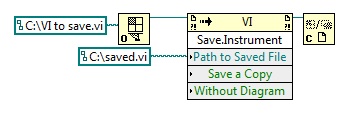
The VI class has a Save Instrument method.
I would suggest searching first. "Programmatically", "VI Server" and "scripting" are all good search terms. Also, looking through the list of methods and properties yourself will help you become more familiar with them.
___________________
Try to take over the world!
12-05-2011 11:54 AM
- Mark as New
- Bookmark
- Subscribe
- Mute
- Subscribe to RSS Feed
- Permalink
- Report to a Moderator
tst,
Thanks... AGAIN!!
I did look through the methods, but was getting stymied... I kept searching for scripting and save vi, and was getting everything but. The suggestion of "programmatic" is the way to go.
Dan

 Darin.K
12-05-2011 12:06 PM
- Mark as New
- Bookmark
- Subscribe
- Mute
- Subscribe to RSS Feed
- Permalink
- Report to a Moderator
Don't forget the Class Browser (Ctrl-Shift-B), you can search for a word (ie. Save) and it will provide a list of properties and methods. Great way to figure out where things are.
12-05-2011 12:13 PM
- Mark as New
- Bookmark
- Subscribe
- Mute
- Subscribe to RSS Feed
- Permalink
- Report to a Moderator
Oh AWESOME.... I really need to use this forum more... Learning SO much.
Thanks,
Dan

12-05-2011 05:08 PM - edited 12-05-2011 05:08 PM
- Mark as New
- Bookmark
- Subscribe
- Mute
- Subscribe to RSS Feed
- Permalink
- Report to a Moderator
HI,
I'm pretty sure you've figured it out, but just in case I've attached a simple VI that saves another VI programmatically. If you want to save multiple VI's you can move the invoke node in a loop and use an array of VI names as an input to your loop.
Senior Systems R&D Engineer | Wireless | CLA
National Instruments
