- Subscribe to RSS Feed
- Mark Topic as New
- Mark Topic as Read
- Float this Topic for Current User
- Bookmark
- Subscribe
- Mute
- Printer Friendly Page
Producing data to a loop with an event structure
Solved!
 jonrie1
03-02-2012 08:34 AM
- Mark as New
- Bookmark
- Subscribe
- Mute
- Subscribe to RSS Feed
- Permalink
- Report to a Moderator
I'm relatively new to Labview programming (as will be seen in my program below). I found a vi online that collects data from a 9237 bridge analog USB card. That is the top portion of the vi is what collects the data. The original place the output in a graph, but I have changed it to a numeric indicator.
The lower portion I'm trying to have the operator use the start, stop, reset buttons to interact with the system. I used an event structure to do this. Every this works well, except for the event that the value of the load cell data (from above loop). I want it to act on the new value continuously, but it only acts one time. All other features work fine. Can someone explain how I would best accomplish this?
Any help would be apprciated.
Solved! Go to Solution.

 RavensFan

03-02-2012 08:44 AM
- Mark as New
- Bookmark
- Subscribe
- Mute
- Subscribe to RSS Feed
- Permalink
- Report to a Moderator
Why are you using a queue to pass the data from one loop to the other? The reason it only works one time is that the lower loop will wait until an event has occurred.
I would eliminate the queue. Wire the Total into a property node for Total Value (signalling). That will trigger the event case for the Total: Value Change event to fire.
Don't read from property nodes in the upper loop when you have the indicators and wires right there to read from.

 Norbert_B
03-02-2012 08:51 AM
- Mark as New
- Bookmark
- Subscribe
- Mute
- Subscribe to RSS Feed
- Permalink
- Report to a Moderator
Additionally, this below is a no-go:
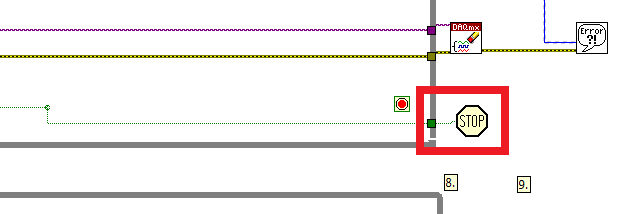
Norbert
----------------------------------------------------------------------------------------------------
CEO: What exactly is stopping us from doing this?
Expert: Geometry
Marketing Manager: Just ignore it.
03-05-2012 07:07 AM
- Mark as New
- Bookmark
- Subscribe
- Mute
- Subscribe to RSS Feed
- Permalink
- Report to a Moderator
Actually the producer/consumer with the queue was a recommendation by one of the ni techs when I called for tech support. I originally had a property node but I was using Value, not Value (signaling). You suggestion did the trick.
