- Subscribe to RSS Feed
- Mark Topic as New
- Mark Topic as Read
- Float this Topic for Current User
- Bookmark
- Subscribe
- Mute
- Printer Friendly Page
Graph an Array, but not every row of it?
Solved!
 gjacob
07-20-2010 02:57 PM
- Mark as New
- Bookmark
- Subscribe
- Mute
- Subscribe to RSS Feed
- Permalink
- Report to a Moderator
I'm trying to graph an array of data so that several waveforms show up on my waveform graph. The array has 500 rows but I don't want to plot every one, only the first row, 20th, 40th, 60th, ..., 500th row. I was thinking of using a for loop to extract the rows I need using the "array subset" VI, but I am not sure how to configure the inputs. Also, if there is a better way, can anyone let me know? Thanks!
Solved! Go to Solution.

 GregFreeman

07-20-2010 03:11 PM - edited 07-20-2010 03:14 PM
- Mark as New
- Bookmark
- Subscribe
- Mute
- Subscribe to RSS Feed
- Permalink
- Report to a Moderator
I don't have LabVIEW in front of me, but look at the context help (ctrl+h) for waveforms. It will have something about plotting multiple on one graph. I'm guessing you will want to use index array. You can expand the VI and physically wire (20, 40, 60 etc) or you can use a for loop and have your counter be 20 * i. Wire that 20*i up to the index input for index array. Wire your array up to the array input for index array. Then use autoindexing on the other side of your for loop which will build an array of rows 20,40,60 etc. This is the array you will wire to your waveform. Sorry if this was a bit confusing, I'm sure someone can code an example up for you real quick.
GregFreeman
07-20-2010 03:35 PM - edited 07-20-2010 03:37 PM
- Mark as New
- Bookmark
- Subscribe
- Mute
- Subscribe to RSS Feed
- Permalink
- Report to a Moderator
Got some LabVIEW access. Something like this? For scalability you will probably want to replace the 500 constant with a get array size function. That way if your array size changes, you will insure you will still get all the data without modifying code

 Darin.K
07-20-2010 03:36 PM
- Mark as New
- Bookmark
- Subscribe
- Mute
- Subscribe to RSS Feed
- Permalink
- Report to a Moderator
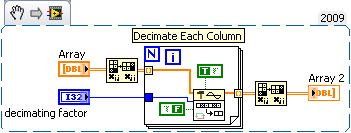
If you have the Professional version of LV I would take advantage of the Decimate VI.
 mahu
mahu
07-20-2010 03:42 PM
- Mark as New
- Bookmark
- Subscribe
- Mute
- Subscribe to RSS Feed
- Permalink
- Report to a Moderator
You can try many ways. Try with this simple way. Only change the input.


Regards

 elset191
07-20-2010 03:53 PM
- Mark as New
- Bookmark
- Subscribe
- Mute
- Subscribe to RSS Feed
- Permalink
- Report to a Moderator
@Darin.K wrote:
If you have the Professional version of LV I would take advantage of the Decimate VI.
Nice. I tried to use the Decimate 1D Array vi, then realized it was for 1D arrays and that clever transposing trick never occured to me. I didn''t know the Decimate vi you used existed until just now.
Tim Elsey
Certified LabVIEW Architect
07-20-2010 04:11 PM
- Mark as New
- Bookmark
- Subscribe
- Mute
- Subscribe to RSS Feed
- Permalink
- Report to a Moderator
Well, I have been trying all of these different ways suggested but none of them really gave the display I was expecting. I am not sure if the problem is with the data or with the program, so I will keep looking at it.
GregFreeman
07-20-2010 04:16 PM - edited 07-20-2010 04:16 PM
- Mark as New
- Bookmark
- Subscribe
- Mute
- Subscribe to RSS Feed
- Permalink
- Report to a Moderator
is your issue with the delta t of the waveform? That can cause your data to be "smushed" or too spread out.
07-20-2010 04:24 PM
- Mark as New
- Bookmark
- Subscribe
- Mute
- Subscribe to RSS Feed
- Permalink
- Report to a Moderator
I don't think the data was smushed or spread out, it was just way too dense to be the number of plots that I had desired to do. I think the problem may have been transposing the array one too many times. Unfortunately it takes about 5 mins to generate the data again so after one small change it takes a while to test it.
07-20-2010 04:32 PM
- Mark as New
- Bookmark
- Subscribe
- Mute
- Subscribe to RSS Feed
- Permalink
- Report to a Moderator
It looks like it is working well now 🙂 Thanks for the help!
