ni.com is currently undergoing scheduled maintenance.
Some services may be unavailable at this time. Please contact us for help or try again later.
- Document History
- Subscribe to RSS Feed
- Mark as New
- Mark as Read
- Bookmark
- Subscribe
- Printer Friendly Page
- Report to a Moderator
- Subscribe to RSS Feed
- Mark as New
- Mark as Read
- Bookmark
- Subscribe
- Printer Friendly Page
- Report to a Moderator
Image Processing Tutorial
1.1 Introduction
1.2 Using Vision Assistant
1.2.1 Designing a Script
1.2.2 Creating a LabVIEW VI from Your Script
1.3 Integration into a Framework
1.4 Conclusion
1.5 Additional Image Processing Resources

Principal Software Engineer
NI


- Mark as Read
- Mark as New
- Bookmark
- Permalink
- Report to a Moderator
Hey there,
I don't understand, where exactly i find those sample images?

- Mark as Read
- Mark as New
- Bookmark
- Permalink
- Report to a Moderator
Looks like the same images from last year. They must have forgotten to freshen up the link. Here's last year's:
https://decibel.ni.com/content/servlet/JiveServlet/download/14726-4-26372/sample%20images.zip

- Mark as Read
- Mark as New
- Bookmark
- Permalink
- Report to a Moderator
good image process tutorial, but i wanna get some image processing in c sharp...


- Mark as Read
- Mark as New
- Bookmark
- Permalink
- Report to a Moderator
I couldn't follow the tutorial, because it said that "This step can only be done with 2012 Labview VI's" or something like that. How do I do this, then?


- Mark as Read
- Mark as New
- Bookmark
- Permalink
- Report to a Moderator
For this season I would follow the steps listed here:
http://wpilib.screenstepslive.com/s/3120/m/8731/l/90337-target-info-and-retroreflection
They are much better and more detailed. Make sure to view all of the pages in that tutorial.

- Mark as Read
- Mark as New
- Bookmark
- Permalink
- Report to a Moderator
Dear Every1
i am having a problem with the vision assistant especially with the image processing please help.
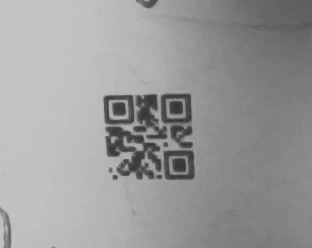
i have to detect QR code
i wil attach the pic of the original qr code when my camera is one
and also post my VI
i am unable to detect the QR code
y
please help

- Mark as Read
- Mark as New
- Bookmark
- Permalink
- Report to a Moderator
you just download the zip file

- Mark as Read
- Mark as New
- Bookmark
- Permalink
- Report to a Moderator
can anyone help me find the "make image active" button????

