LabVIEW
- Suscribirse a un feed RSS
- Marcar tema como nuevo
- Marcar tema como leído
- Colocar este tema arriba del foro
- Favorito
- Suscribir
- Silenciar
- Página de impresión sencilla
- « Anterior
-
- 1
- 2
- Siguiente »
Read back sheet names in excel workbook
¡Resuelto!
 Dimo
Dimo
el 08-06-2009 04:35 AM
- Marcar como nuevo
- Favorito
- Suscribir
- Silenciar
- Suscribirse a un feed RSS
- Resaltar
- Imprimir
- Informe de contenido inapropiado
I'm trying to build a vi to organize my data in Excel workbooks.
There are available ActiveX controls to communicate with MS Office, but I couldn't find any usable help and detailed explanation of controls, properties, arguments, commands etc.
For example, I want to do simple task- to open a workbook and read back the list of worksheets names.
Generally- where I can find a help for the activeX controls? Are they part of the MSO excel activeX library (if so, where I can find info), or this is a library build by NI?
Or I must browse and guess all the properties blindly until find some dodgy way>
¡Resuelto! Ir a solución.

 parthabe
el 08-06-2009 05:14 AM
- Marcar como nuevo
- Favorito
- Suscribir
- Silenciar
- Suscribirse a un feed RSS
- Resaltar
- Imprimir
- Informe de contenido inapropiado


 Julien_31
el 08-06-2009 05:16 AM
- Marcar como nuevo
- Favorito
- Suscribir
- Silenciar
- Suscribirse a un feed RSS
- Resaltar
- Imprimir
- Informe de contenido inapropiado
Here is an old stuff I made for a guy who asked a question about ActiveX and Excel (see attached screenshot). I've added a property node to show you how you can retrieve a sheet name.
Generally, you can have a look at some examples included when you install LabVIEW : you can search an example by name (you just need to type "ActiveX" or "Excel"). The problem with ActiveX is that it's not always well documented.
el 08-06-2009 05:30 AM
- Marcar como nuevo
- Favorito
- Suscribir
- Silenciar
- Suscribirse a un feed RSS
- Resaltar
- Imprimir
- Informe de contenido inapropiado
Thanks Krzone, this is exactly the answer.
Also, thanks to parthabe, the link to the excel board is great help.
Appears the answers are more in VB and Excel forums, than in LV. Still I must find out how to translate VB to LV... looks simple but...
parthabe
el 08-06-2009 05:36 AM
- Marcar como nuevo
- Favorito
- Suscribir
- Silenciar
- Suscribirse a un feed RSS
- Resaltar
- Imprimir
- Informe de contenido inapropiado
Dimo wrote:
Appears the answers are more in VB and Excel forums, than in LV.
I m afraid, there is no Excel forum/board within NI site, it is actually a Excel (repository) thread floated in the Special Interest Board Breakpoint.

 Davidek
el 08-06-2009 07:35 AM
- Marcar como nuevo
- Favorito
- Suscribir
- Silenciar
- Suscribirse a un feed RSS
- Resaltar
- Imprimir
- Informe de contenido inapropiado
Hi Dimo
Once you move into ActiveX and Excel territory MSDN is a good resource for information on Excel specific methods, arguments and so on. The examples are in C#, VB or C++, but you get an idea on how to use calls in the enviroment. Hope this helps.
Best Regards
David
NISW
el 08-06-2009 08:45 AM
- Marcar como nuevo
- Favorito
- Suscribir
- Silenciar
- Suscribirse a un feed RSS
- Resaltar
- Imprimir
- Informe de contenido inapropiado
Hi Krsone,
Again, thanks for your example, I attached my vi doing exactly this:
Opens excel file, and reports a list of worksheet names found in the workbook.
It can be used as a subvi to open workbook/find worksheet by name and edit/modify cells etc.
 Andrew_Scott_SP
el 05-14-2015 07:51 PM
- Marcar como nuevo
- Favorito
- Suscribir
- Silenciar
- Suscribirse a un feed RSS
- Resaltar
- Imprimir
- Informe de contenido inapropiado
Thanks to both of you for posting your VIs. I wanted to do a similar thing and it made my life easy.
Here is a VI that returns an array of strings from a section of a sheet.
I found the grid to cell number VI on yet another post. don't remember where, but thanks to that person too...
Andrew

 Bob_Schor

el 05-15-2015 08:19 AM
- Marcar como nuevo
- Favorito
- Suscribir
- Silenciar
- Suscribirse a un feed RSS
- Resaltar
- Imprimir
- Informe de contenido inapropiado
I don't know why the excellent (and easy-to-use) tools in the Report Generation Toolkit are not mentioned. Here is a little routine that returns all of the WorkSheet names.
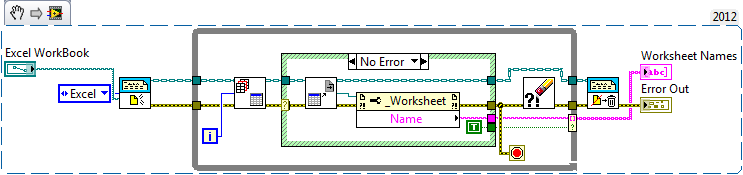

The first function, New Report, opens the Excel Workbook and generates an Object "wire" for it. The While loop starts with Excel Get Worksheet, trying to get Worksheet 0, 1, ... (until it tries to get the successor to the last Worksheet, which returns an Error). If it succeeds, it calls the Get ActiveX References, and we use the Worksheet reference to get the Worksheet Name. Pretty straight-forward so far. The Error case (not shown) wires a blank to the name, and a False to the Conditional Index terminal (instead of True, as is shown here). The Name and Conditional Index values are brought to a Conditional Index terminal, which builds our Array of Names (leaving off the blank name for the final non-existant Worksheet). We end the While loop on the Error condition, clearing the Error before exiting the loop.
Bob Schor
 locktofer
el 05-07-2019 04:41 PM
- Marcar como nuevo
- Favorito
- Suscribir
- Silenciar
- Suscribirse a un feed RSS
- Resaltar
- Imprimir
- Informe de contenido inapropiado
hi Bob, this is a really good solution, but I cannot get my labview to do a conditional index terminal like you have here. Also please post the error state to make sure I get it right. Thanks and regards. I am using Labview 2010
- « Anterior
-
- 1
- 2
- Siguiente »
