- RSS フィードを購読する
- トピックを新着としてマーク
- トピックを既読としてマーク
- このスレッドを最上位に表示
- {0}にこのスレッドを追加する
- 購読
- ミュート
- 印刷用ページに変更
File Explorer Sort
解決済み
 Sable
Sable
12-27-2018 01:09 PM
- 新着としてマーク
- {0}にこのメッセージを追加する。
- 購読
- ミュート
- RSS フィードを購読する
- このメッセージをハイライトする
- このメッセージを印刷する
- 管理者に不正使用を報告する
I would like to sort files and folders EXACTLY the way File Explorer does on Windows 10.
Gone through a number of example programs from the forum but they do not work exactly.
Apparently File Explorer calls a function called StrCmpLogicalW.
Is there a way I could call this function from LabVIEW?
Appreciate any suggestions on how this can be done with LabVIEW.
解決済! 解決策の投稿を見る。

 rolfk
rolfk

12-27-2018 03:24 PM
- 新着としてマーク
- {0}にこのメッセージを追加する。
- 購読
- ミュート
- RSS フィードを購読する
- このメッセージをハイライトする
- このメッセージを印刷する
- 管理者に不正使用を報告する
There is of course, with the Call Library Node. But as the W at the end of the name indicates, does this function use Unicode strings while LabVIEW strings are ANSI. So you would have to convert every single file name with the function MultiByteToWideChar() first. This will get somewhat complicated to to yourself but fortunately there are functions in this thread, that do this already. You probably want to download and install the ni_lib_unicode_2.0.0.4.vip file from that list.
However it would be possible to create a similar comparison function fully in LabVIEW. The magic is to recognize numbers as whole numbers and sort the strings first alphabetically and if the part up to the number is the the same compare the numbers as whole instead of alphabetically.

12-27-2018 10:37 PM
- 新着としてマーク
- {0}にこのメッセージを追加する。
- 購読
- ミュート
- RSS フィードを購読する
- このメッセージをハイライトする
- このメッセージを印刷する
- 管理者に不正使用を報告する
Thank you rolfk.
Following your first paragraph, do you have an example on how should I convert the ANSI to Unicode then parse this into the Call Library Node?

 bseguin
12-28-2018 03:21 AM
- 新着としてマーク
- {0}にこのメッセージを追加する。
- 購読
- ミュート
- RSS フィードを購読する
- このメッセージをハイライトする
- このメッセージを印刷する
- 管理者に不正使用を報告する

Like this.
Benoit
12-28-2018 04:49 AM
- 新着としてマーク
- {0}にこのメッセージを追加する。
- 購読
- ミュート
- RSS フィードを購読する
- このメッセージをハイライトする
- このメッセージを印刷する
- 管理者に不正使用を報告する
Thanks Bseguin.
Can anyone show me how to feed this converted Unicode string into the StrCmpLogicalW function in the Call Library Node?
rolfk
12-28-2018 07:42 AM - 編集済み 12-28-2018 07:44 AM
- 新着としてマーク
- {0}にこのメッセージを追加する。
- 購読
- ミュート
- RSS フィードを購読する
- このメッセージをハイライトする
- このメッセージを印刷する
- 管理者に不正使用を報告する
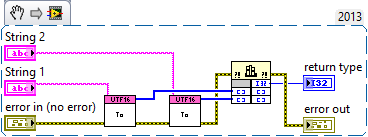
It's as "simple" as this (but the used ASCI to UTF16 function is of course Windows only too, but logically correct unlike the other proposed solution which will fail for any ASCII code point above 127):
12-28-2018 11:00 AM
- 新着としてマーク
- {0}にこのメッセージを追加する。
- 購読
- ミュート
- RSS フィードを購読する
- このメッセージをハイライトする
- このメッセージを印刷する
- 管理者に不正使用を報告する
Thank you rolfk .
Can you please elaborate more on your statement "but the used ASCI to UTF16 function is of course Windows only too, but logically correct unlike the other proposed solution which will fail for any ASCII code point above 127"?
rolfk
12-29-2018 07:29 AM - 編集済み 12-29-2018 07:30 AM
- 新着としてマーク
- {0}にこのメッセージを追加する。
- 購読
- ミュート
- RSS フィードを購読する
- このメッセージをハイライトする
- このメッセージを印刷する
- 管理者に不正使用を報告する
Since my VI uses a Call Library Node to call a Windows API, it won't be possible to execute it on non-Windows LabVIEW platforms.
The function as proposed by bseguin does convert the ASCII codes into pseudo UTF16LE by converting all the ASCII codes 0x00 ..0xFF to 16 bit code points 0x0000 ... 0x00FF. That is only correct for the 7-bit ASCII codes 0x00 ... 0x7E. Above 0x007F the mapping between ASCII and Unicode is not the same anymore. Windows Latin-1 (codepage 1252) uses with some exceptions the same extended characters as ISO IEC8859-1 but is not the same. But if your configured local is not using Latin-1 then this mapping gets for those extended ASCII codes completely wrong.
12-30-2018 05:06 AM
- 新着としてマーク
- {0}にこのメッセージを追加する。
- 購読
- ミュート
- RSS フィードを購読する
- このメッセージをハイライトする
- このメッセージを印刷する
- 管理者に不正使用を報告する
Rolfk, this is excellent support. Thank you.
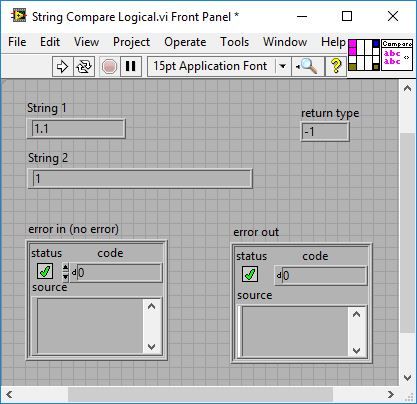
Your code works intermittently at times.
When I set String 1 to 1.1 and String 2 to 1, I will get a return value of 1 (this is correct).
But then I set String 2 to 1.1 (equal to String 1), I get a return value of -1 (it should be 0).
After this when I set String 2 back to 1 (same as the first step), the return value will now change to -1 (it should be 1).
Do you know why this is happening?
rolfk
12-30-2018 08:44 AM - 編集済み 12-30-2018 08:47 AM
- 新着としてマーク
- {0}にこのメッセージを追加する。
- 購読
- ミュート
- RSS フィードを購読する
- このメッセージをハイライトする
- このメッセージを印刷する
- 管理者に不正使用を報告する
Try with this subVI instead.
