User Prompted File Format and Auto Generated Name

 HarryTaylor
Hi!
I am working a program whereby the user can input multiple HDF5 files at once, and I would like for the programme to do two things:
1. Give the user a control which allows them to change what file type the output should be (i.e. they choose from .pdf, .emf etc)
2. Automatically make the output file names the exact same as the input name (but with the different file extension now)
On the Advanced Plotting Toolkit Save VI there is no option for output file extension. There is an option for file path, but that requires you to select a file which is already in the format you want (i.e. if you want it to save as a PDF you have to click on a PDF file which already exists)
Does anyone have any idea how I should go about doing this?
Thanks!

 cstorey
HI,
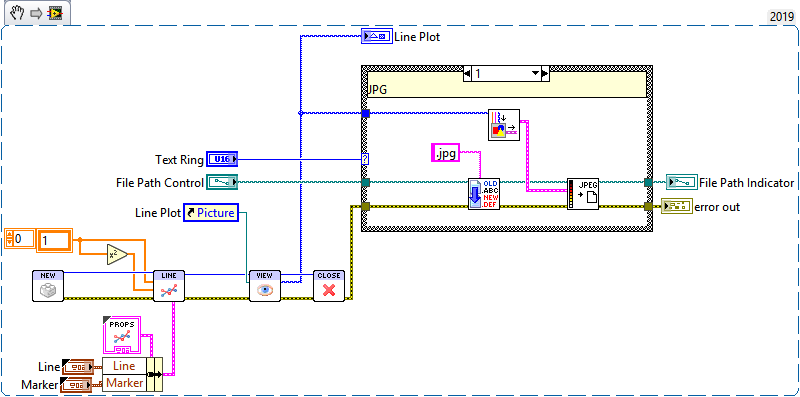
APT just creates an image of your plot. You can decide to do whatever you want with the image from there - display in indicator, export to PNG, JPG, add it to reports, create PDFs, etc..
I'll show you how I handle filenames and image export later tonight. Its really just strip the file extension, maybe change the output path, append new extension, then export appropriately. All that can be controlled by a text ring with options for PNG, PDF, JPEG which is attached to a case structure which handles the image creation and export.
Craig