ni.com is currently undergoing scheduled maintenance.
Some services may be unavailable at this time. Please contact us for help or try again later.
- Subscribe to RSS Feed
- Mark Topic as New
- Mark Topic as Read
- Float this Topic for Current User
- Bookmark
- Subscribe
- Mute
- Printer Friendly Page
Why don't I see the serial port names such as COMx? I have to use ASRLx::INSTR
 _S_G
03-11-2008 06:35 PM - edited 03-11-2008 06:36 PM
- Mark as New
- Bookmark
- Subscribe
- Mute
- Subscribe to RSS Feed
- Permalink
- Report to a Moderator
Message Edited by S G on 03-11-2008 06:35 PM
Message Edited by S G on 03-11-2008 06:36 PM
Certified LabVIEW Architect, Certified TestStand Architect, Certified Professional Instructor

 Ray.R

03-11-2008 08:33 PM
- Mark as New
- Bookmark
- Subscribe
- Mute
- Subscribe to RSS Feed
- Permalink
- Report to a Moderator
It has to do with the alias name to COM1. I can't remember exactly in which ini file it resides, but I seem to recall that you can change it within MAX.
I'll try to find the ini file. Or where in MAX to change it.
Ray.R
03-11-2008 08:42 PM - edited 03-11-2008 08:43 PM
- Mark as New
- Bookmark
- Subscribe
- Mute
- Subscribe to RSS Feed
- Permalink
- Report to a Moderator
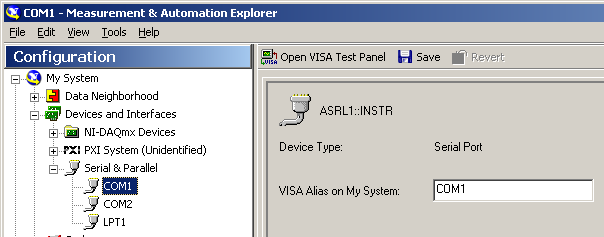
Message Edited by JoeLabView on 03-11-2008 09:43 PM
 _S_G
03-12-2008 01:08 PM - edited 03-12-2008 01:08 PM
- Mark as New
- Bookmark
- Subscribe
- Mute
- Subscribe to RSS Feed
- Permalink
- Report to a Moderator
Message Edited by S G on 03-12-2008 01:08 PM
Certified LabVIEW Architect, Certified TestStand Architect, Certified Professional Instructor
Ray.R
03-12-2008 01:53 PM
- Mark as New
- Bookmark
- Subscribe
- Mute
- Subscribe to RSS Feed
- Permalink
- Report to a Moderator
That's a good question... I don't know the answer..
I did see that issue before which is where I modified the ini file. But I think the first time I saw it was with the Developper Suite and LV6.1. Plus I saw it again with CVI. So, I don't know what is the common denominator..
Glad it helped,
RayR

 Dennis_Knutson
03-12-2008 02:29 PM
- Mark as New
- Bookmark
- Subscribe
- Mute
- Subscribe to RSS Feed
- Permalink
- Report to a Moderator
SG,
What is the version of LabVIEW and NI-VISA that you are using? If LabVIEW 8.x and the VISA that came with those, you can only select the VISA run-time but this should still work. You can optionally select to export your MAX configuration and this should also include the aliases (ComX).
With some older versions of NI-VISA, installing just the VISA run-time did not force VISA to assign the aliases to a com port. You had to include the visaconf.ini file from the development pc.
_S_G
03-12-2008 02:32 PM
- Mark as New
- Bookmark
- Subscribe
- Mute
- Subscribe to RSS Feed
- Permalink
- Report to a Moderator
Certified LabVIEW Architect, Certified TestStand Architect, Certified Professional Instructor
Dennis_Knutson
03-12-2008 03:11 PM
- Mark as New
- Bookmark
- Subscribe
- Mute
- Subscribe to RSS Feed
- Permalink
- Report to a Moderator
Ray.R
03-12-2008 04:04 PM
- Mark as New
- Bookmark
- Subscribe
- Mute
- Subscribe to RSS Feed
- Permalink
- Report to a Moderator
Dennis is right 🙂 Not that I would ever doubt him 😄
The newer version of LV do not have visaconf.ini, so please ignore some of the info from my original post.
I did find an old version which contained the following:
[VISA-CONFIG]
MinAsyncCount = 512
SharedMemSize = 196608
MaxNumResources = 256
NumSystemSems = 512
NumProcessSems = 256
UnloadPassports = 0
ShowRegisteredDevOnly = 1
[ALIASES]
Alias0 = "'LPT1','ASRL10::INSTR'"
Alias1 = "'COM1','ASRL1::INSTR'"
NumAliases = 2
BTW, Dennis, do you know where that info is hidden with the newer version? I can always do a search for COM1 as a text string.. This is just my personal curiosity. The last time I modified the visaconf.ini file was for a CVI project back in 2004, which was for legacy code dating back to 2001.
Dennis_Knutson
03-12-2008 04:44 PM
- Mark as New
- Bookmark
- Subscribe
- Mute
- Subscribe to RSS Feed
- Permalink
- Report to a Moderator
It's still in visaconf.in but the location of the file has moved. It's now in c:\Documents and Settings\All Users\Application Data\National Instruments\NIvisa.
When I had the recent problem with my installer, it turns out that the upgrade to the latest VISA did not remove the visconf from the c:\vxipnp\etc. folder. I could do some wmanual stuff and clean up the old folder and my app started to work.
