- Subscribe to RSS Feed
- Mark Topic as New
- Mark Topic as Read
- Float this Topic for Current User
- Bookmark
- Subscribe
- Mute
- Printer Friendly Page
Transmitting the payload hex bytes as is to a excel sheet as it converts to dec

 mjafarin
01-24-2017 04:54 PM
- Mark as New
- Bookmark
- Subscribe
- Mute
- Subscribe to RSS Feed
- Permalink
- Report to a Moderator
Attached is the modified NI-XNET subVI - CAN Frame to Table. Transferring the hex data stream to a file (.txt, .xcl) causes the stream to convert to decimal. How can it be saved in its original hex format? That is the issue.
01-24-2017 04:56 PM - edited 01-24-2017 04:57 PM
- Mark as New
- Bookmark
- Subscribe
- Mute
- Subscribe to RSS Feed
- Permalink
- Report to a Moderator
Excel data sheet for the same program.

 RTSLVU
01-24-2017 05:05 PM - edited 01-24-2017 05:08 PM
- Mark as New
- Bookmark
- Subscribe
- Mute
- Subscribe to RSS Feed
- Permalink
- Report to a Moderator
I can't see how you are writing to your file but try the %x format so numbers are written as hex numbers instead of the default (floating point decimal %f).
Or posibly the %S so they are writtne as strings, then maybe Excel will not reformat them to decimal.
Also you can highlight the cells and use "format cells" in Excel to change the format to Hex
=== Engineer Ambiguously ===
========================
01-24-2017 06:00 PM
- Mark as New
- Bookmark
- Subscribe
- Mute
- Subscribe to RSS Feed
- Permalink
- Report to a Moderator
CAN Frame to Table VI reads the data through write delimited spreadsheet VI. Write spreadsheet string is one of the subVIs in delimited speadsheet. I tried changing the formats to %x and %s but it changing back to %d when it starts running. That could be the problem. Now; I think, the issue is how can the default value can be changed and set in the Write delimiyted spreadsheet VI program. You advise is greatly appreciated.

 crossrulz

01-24-2017 06:13 PM
- Mark as New
- Bookmark
- Subscribe
- Mute
- Subscribe to RSS Feed
- Permalink
- Report to a Moderator
Where is the VI that calls the Write Delimited String? Does the CAN VI have a format input?
There are only two ways to tell somebody thanks: Kudos and Marked Solutions
Unofficial Forum Rules and Guidelines
"Not that we are sufficient in ourselves to claim anything as coming from us, but our sufficiency is from God" - 2 Corinthians 3:5
01-24-2017 06:30 PM
- Mark as New
- Bookmark
- Subscribe
- Mute
- Subscribe to RSS Feed
- Permalink
- Report to a Moderator
crossrulz
01-24-2017 07:03 PM
- Mark as New
- Bookmark
- Subscribe
- Mute
- Subscribe to RSS Feed
- Permalink
- Report to a Moderator
Since you are already using a modified version, just add a constant to the CAN VI to set the format. That format is then passed into the Write Delimited Text File.
There are only two ways to tell somebody thanks: Kudos and Marked Solutions
Unofficial Forum Rules and Guidelines
"Not that we are sufficient in ourselves to claim anything as coming from us, but our sufficiency is from God" - 2 Corinthians 3:5
RTSLVU
01-25-2017 09:25 AM - edited 01-25-2017 09:28 AM
- Mark as New
- Bookmark
- Subscribe
- Mute
- Subscribe to RSS Feed
- Permalink
- Report to a Moderator
@mjafarin wrote:
CAN Frame to Table VI reads the data through write delimited spreadsheet VI. Write spreadsheet string is one of the subVIs in delimited speadsheet. I tried changing the formats to %x and %s but it changing back to %d when it starts running. That could be the problem. Now; I think, the issue is how can the default value can be changed and set in the Write delimiyted spreadsheet VI program. You advise is greatly appreciated.
Are saying this does not work?
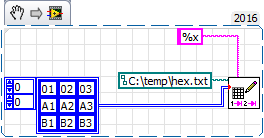


Once you have it in Excel formatting the colums as text makes them lineup left justified.
=== Engineer Ambiguously ===
========================

 RavensFan
01-25-2017 09:46 AM
- Mark as New
- Bookmark
- Subscribe
- Mute
- Subscribe to RSS Feed
- Permalink
- Report to a Moderator
What do you mean it is turning it back to %d?
If you change the constant to %x, it stays, and works. At least for me in LV 2015. If it isn't for you, that would be the sign of a major LabVIEW bug. Unless you are doing something different than what you are describing.
01-25-2017 12:35 PM
- Mark as New
- Bookmark
- Subscribe
- Mute
- Subscribe to RSS Feed
- Permalink
- Report to a Moderator
In fact this is exactly what is happening. Unless there are some hidden steps/configurations that I am not aware of.


