- Subscribe to RSS Feed
- Mark Topic as New
- Mark Topic as Read
- Float this Topic for Current User
- Bookmark
- Subscribe
- Mute
- Printer Friendly Page
MenuStrip font size
Solved!
 bienieck
01-09-2017 09:12 AM
- Mark as New
- Bookmark
- Subscribe
- Mute
- Subscribe to RSS Feed
- Permalink
- Report to a Moderator
Does anyone knows how to change font size in the MenuStrip?
I want to replace standard LabVIEW runtime menu with .NET MenuStrip to have a posibility to make it bigger and more suitable for touchscreens. MSDN said that MenuStrip has a font property which "Gets or sets the font used to display text in the control" but it looks like read only property (I'm unable to change it to write)...
CLA, CTA, CPI
- Did someone devote their time to help solve your problem? Appreciate it and give kudos.
- Problem solved? Accept as a solution so that others can find it faster in the future.
- Contribute to the development of TestStand by voting on the TestStand Idea Exchange.
Solved! Go to Solution.

01-11-2017 08:06 AM
- Mark as New
- Bookmark
- Subscribe
- Mute
- Subscribe to RSS Feed
- Permalink
- Report to a Moderator
Hello bienieck,
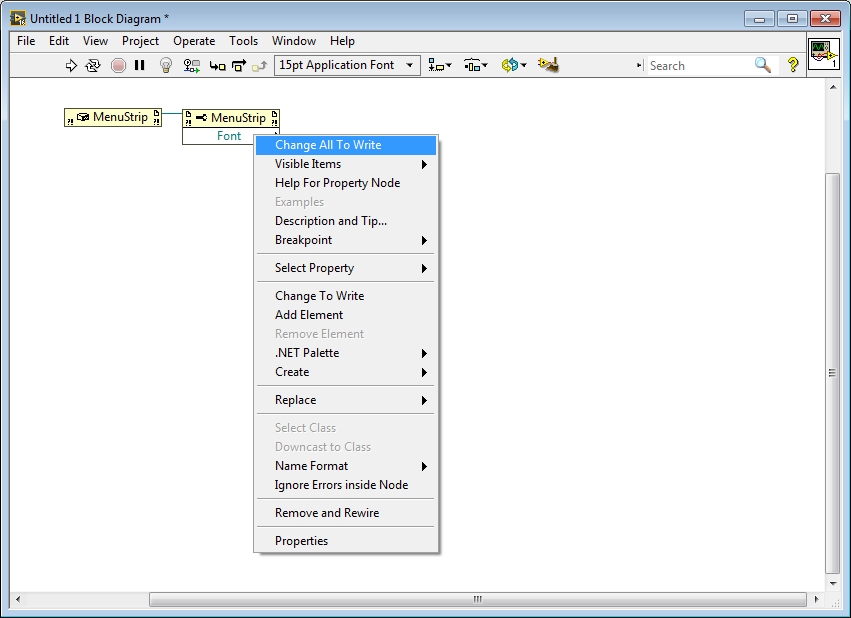
I checked in LabVIEW 2016 and everything seems to work fine for me. After Creating MenuStrip via Constructor Node, I place Property Node (.NET), choose property Font, right click on the property name and I can Change All To Write.

 J-M
J-M
01-11-2017 10:53 AM
- Mark as New
- Bookmark
- Subscribe
- Mute
- Subscribe to RSS Feed
- Permalink
- Report to a Moderator
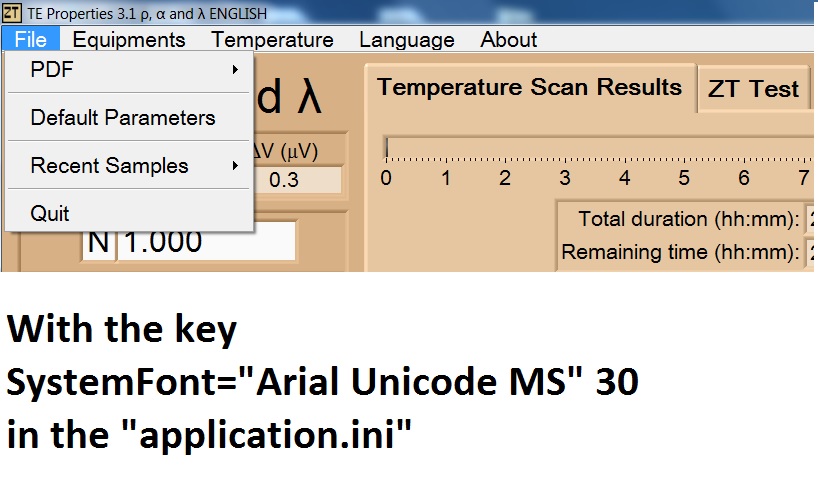
Instead using the menu strip, maybe you could increase the size of the font of the Labview runtime menu (not that much, because the menu has a determined height) with the key:
SystemFont="Arial Unicode MS" 30
in the application.ini


01-13-2017 02:49 AM
- Mark as New
- Bookmark
- Subscribe
- Mute
- Subscribe to RSS Feed
- Permalink
- Report to a Moderator
@Martiko wrote:
Hello bienieck,
I checked in LabVIEW 2016 and everything seems to work fine for me. After Creating MenuStrip via Constructor Node, I place Property Node (.NET), choose property Font, right click on the property name and I can Change All To Write.
But then, can you put in example "size" property and change it to write?
CLA, CTA, CPI
- Did someone devote their time to help solve your problem? Appreciate it and give kudos.
- Problem solved? Accept as a solution so that others can find it faster in the future.
- Contribute to the development of TestStand by voting on the TestStand Idea Exchange.
01-13-2017 02:50 AM
- Mark as New
- Bookmark
- Subscribe
- Mute
- Subscribe to RSS Feed
- Permalink
- Report to a Moderator
@J-M wrote:
Instead using the menu strip, maybe you could increase the size of the font of the Labview runtime menu
I tried this but I feel like it is not very elegant and it is not customizable enough.
CLA, CTA, CPI
- Did someone devote their time to help solve your problem? Appreciate it and give kudos.
- Problem solved? Accept as a solution so that others can find it faster in the future.
- Contribute to the development of TestStand by voting on the TestStand Idea Exchange.
01-13-2017 04:51 AM
- Mark as New
- Bookmark
- Subscribe
- Mute
- Subscribe to RSS Feed
- Permalink
- Report to a Moderator
@Martiko wrote:
(...) I checked in LabVIEW 2016 and everything seems to work fine for me (...).
@bienieck wrote:
But then, can you put in example "size" property and change it to write?
Hi bieneck,
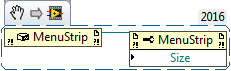
It seems to be working with "Size" exactly the same as with "Font" for me.
May I help you any further?
01-13-2017 09:50 AM
- Mark as New
- Bookmark
- Subscribe
- Mute
- Subscribe to RSS Feed
- Permalink
- Report to a Moderator
Oh, you were right. I thought that I need to use it this way:

And this way I can't change "size" to write.
It seems that I just don't know how to use it 🙂
CLA, CTA, CPI
- Did someone devote their time to help solve your problem? Appreciate it and give kudos.
- Problem solved? Accept as a solution so that others can find it faster in the future.
- Contribute to the development of TestStand by voting on the TestStand Idea Exchange.

 aa@ray
11-25-2025 06:15 PM
- Mark as New
- Bookmark
- Subscribe
- Mute
- Subscribe to RSS Feed
- Permalink
- Report to a Moderator
This works for LabVIEW 2024. Thank you.
aa@ray
11-26-2025 02:51 PM
- Mark as New
- Bookmark
- Subscribe
- Mute
- Subscribe to RSS Feed
- Permalink
- Report to a Moderator
When Application Builder creates an executable, it also creates two additional files; one .ini file and one .aliases file

Edit the Application.ini file to change the menu font and font size:
Original menu:

Original Application.ini file:

Added one line to the .ini file:

and the menu looks like this:

This works on LV2024 with menus created using the Edit --> Run-Time Menu... command

Alejandro A

 zou
zou
11-26-2025 03:42 PM
- Mark as New
- Bookmark
- Subscribe
- Mute
- Subscribe to RSS Feed
- Permalink
- Report to a Moderator
The menu bar on the front panel is NOT a Windows object. There is no guarantee NI will 100% honor Windows settings.
Every thing on the front panel (That includes menu bar, tool bar, and scroll bars... Except the title bar and 10-pixel edge on the left, right and bottom sides) are draw by LabVIEW.
