- Subscribe to RSS Feed
- Mark Topic as New
- Mark Topic as Read
- Float this Topic for Current User
- Bookmark
- Subscribe
- Mute
- Printer Friendly Page
Excel chart color problem using ActiveX (not RGT).
Solved!
 murchak
05-04-2017 04:49 PM
- Mark as New
- Bookmark
- Subscribe
- Mute
- Subscribe to RSS Feed
- Permalink
- Report to a Moderator
I am inserting Excel charts into an Excel sheet using ActiveX (not using RGT at all).
The subVI below shows how I format the Chart and Plot Areas. The colors produced on the Excel chart completely don't match what I choose. Yellow comes out as blue, and so on.

Solved! Go to Solution.

 aputman
05-04-2017 05:00 PM
- Mark as New
- Bookmark
- Subscribe
- Mute
- Subscribe to RSS Feed
- Permalink
- Report to a Moderator
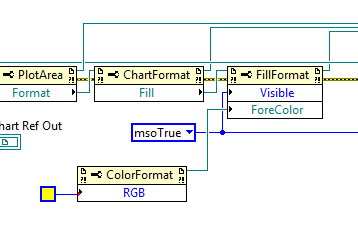
I think you are doing it backward. Try this.
 aputman
05-04-2017 05:05 PM
- Mark as New
- Bookmark
- Subscribe
- Mute
- Subscribe to RSS Feed
- Permalink
- Report to a Moderator
Actually it may just be the way colors are defined in Labview versus Excel. If what I suggested above doesn't work, there is a VI called Convert OLE Color that may give you the right color. Use Ctrl + Space to search for the VI.
05-04-2017 05:24 PM
- Mark as New
- Bookmark
- Subscribe
- Mute
- Subscribe to RSS Feed
- Permalink
- Report to a Moderator
Thank you! Covert OLE Color did the trick. I played around with your first suggestion with no luck. I am not entirely sure if I was doing it backwards. My original formatting subVI worked with some of the colors, but other colors didn't turn out right. I supposed if I did backwards, it would not work with any color.
aputman
05-05-2017 08:16 AM
- Mark as New
- Bookmark
- Subscribe
- Mute
- Subscribe to RSS Feed
- Permalink
- Report to a Moderator
I wasn't really sure if it was backwards either. I was thinking that the color object had to be defined first and then passed as input. Does it work either way?

 ben64
ben64
05-05-2017 09:39 AM
- Mark as New
- Bookmark
- Subscribe
- Mute
- Subscribe to RSS Feed
- Permalink
- Report to a Moderator
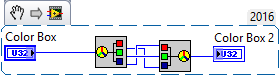
LabVIEW color are 00 RR GG BB and Excel color are 00 BB GG RR so basically what the Convert OLE Color vi do is swap the RR and BB bytes. It could have been done like this also:

05-05-2017 11:36 AM
- Mark as New
- Bookmark
- Subscribe
- Mute
- Subscribe to RSS Feed
- Permalink
- Report to a Moderator
Hi Ben, Aputman,
There was a forum post yesterday for people to post little nuggets of knowledge on anything they had learned or found useful. You are guys are LabVIEW experts and solving an issue like color mismatch between LabVIEW and Excel is trivial for you. But I bet if you post the solutions you offered here in that post, a lot of newbies like myself would find it quite useful. There are a lot of people who use LabVIEW to interact with MS Office. I can imagine this issue would pop up again and again.
