ni.com is currently undergoing scheduled maintenance.
Some services may be unavailable at this time. Please contact us for help or try again later.
- Subscribe to RSS Feed
- Mark Topic as New
- Mark Topic as Read
- Float this Topic for Current User
- Bookmark
- Subscribe
- Mute
- Printer Friendly Page
Disable clicking on the main scream when the sub-VI is called
Solved!
 IanYuan
10-23-2017 08:22 PM - edited 10-23-2017 08:22 PM
- Mark as New
- Bookmark
- Subscribe
- Mute
- Subscribe to RSS Feed
- Permalink
- Report to a Moderator
Hi all,
When I open the front panel of sub-VI from my main window (by using SubVI Node Setup > Show front panel when called), if I click a button (or something else) on the main window, it will still work after I close the subVI window. Is it possible to completely disable the clicking on the not used window when the sub-VI is called (two windows opened at the same time)?
Ian
Solved! Go to Solution.

 RavensFan

10-23-2017 08:26 PM - edited 10-23-2017 08:38 PM
- Mark as New
- Bookmark
- Subscribe
- Mute
- Subscribe to RSS Feed
- Permalink
- Report to a Moderator
Check the settings of the subVI to make it modal.
10-23-2017 08:37 PM
- Mark as New
- Bookmark
- Subscribe
- Mute
- Subscribe to RSS Feed
- Permalink
- Report to a Moderator
Thank you so much!

 aputman
10-24-2017 09:07 AM
- Mark as New
- Bookmark
- Subscribe
- Mute
- Subscribe to RSS Feed
- Permalink
- Report to a Moderator
Just be careful when using modal windows. You can get into a situation where your main and subVI are deadlocked and nothing can be done to exit. Ctrl+. does not work. Usually requires Ctrl+Alt+Del and you lose any unsaved work.
I'm not aware if this has been addressed somehow in newer versions of Labview.

 stevem181
10-24-2017 03:39 PM
- Mark as New
- Bookmark
- Subscribe
- Mute
- Subscribe to RSS Feed
- Permalink
- Report to a Moderator
Another option is to use the Transparency property to hide the calling vi.
Like this:
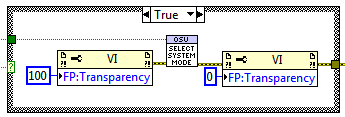
This might give a cleaner look depending on the situation.
You can also do both (use partial Transparency) to make it clear that the background vi is inactive.
In general, I avoid Modal vis (aputman makes a good point - been there), but sometimes they are the best solution.
steve
Founding (and only) member of AUITA - the Anti UI Thread Association.
----------------------------------------------------------------------------------------------------------------
