- Subscribe to RSS Feed
- Mark Topic as New
- Mark Topic as Read
- Float this Topic for Current User
- Bookmark
- Subscribe
- Mute
- Printer Friendly Page
- « Previous
-
- 1
- 2
- Next »
DAQMX task ID with local variables?
Solved!
 JÞB
JÞB
06-21-2017 10:28 PM
- Mark as New
- Bookmark
- Subscribe
- Mute
- Subscribe to RSS Feed
- Permalink
- Report to a Moderator
without looking at ALL of the code we cannot see where you may have race conditions. Excaples those error locals should be on Shift Registers (Just trust me OK?)
A lot of the other locals have no write method shown... that can be a problem if you have independant loops.
Personally, I use a Resource Module (a special type of Action Engine that holds a specific reference to a Resource) for DAQmx Tasks.
"Should be" isn't "Is" -Jay

 Kevin_Price
06-22-2017 09:32 AM
- Mark as New
- Bookmark
- Subscribe
- Mute
- Subscribe to RSS Feed
- Permalink
- Report to a Moderator
A few more quick hit-and-run thoughts:
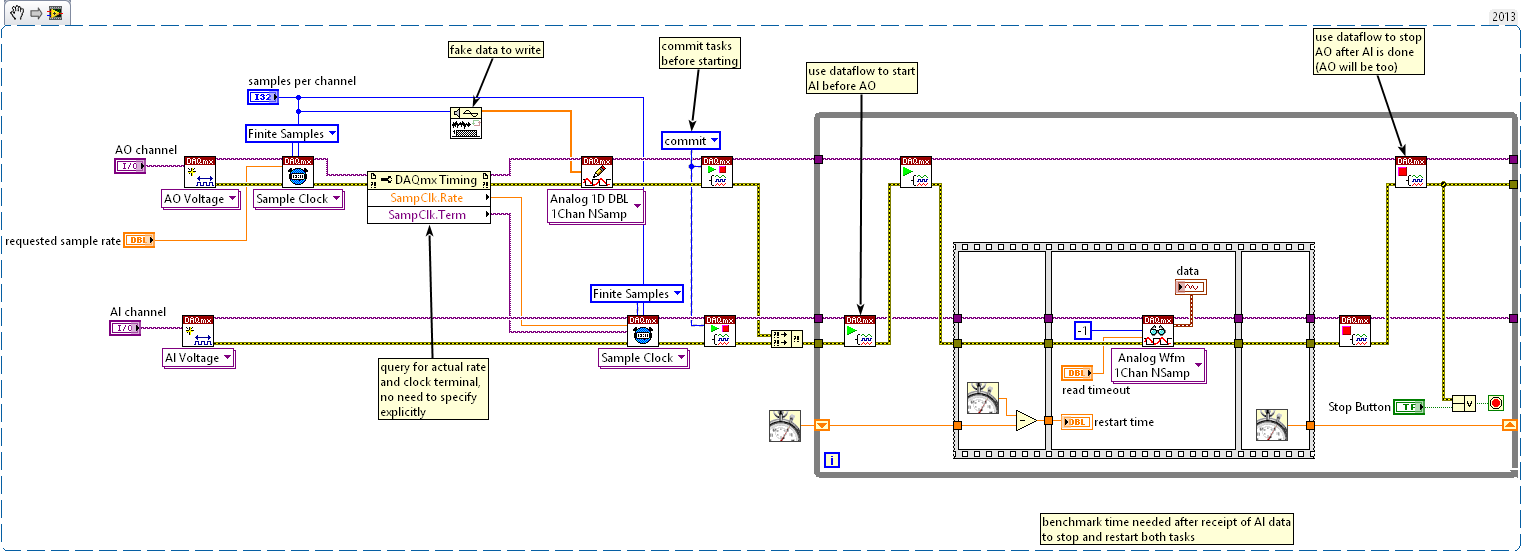
1. It appears you have AO and AI running at the same rate. To sync them in hardware, try sharing a sample clock. I usually sync tasks via sample clock and relatively rarely need or bother with triggers. (I would let AO be master and configure AI to be sensitive to the trailing edge, probably the falling edge. This allows time for AO to propagate and system to respond before AI gets measured.)
2. You can speed up the turnaround time needed by DAQmx to Stop and re-Start a task if you call "DAQmx Control Task" with a "commit" action before the first time you start it. Search for things like DAQmx Task State Model for more info.
3. With a shared sample clock and finite sampling, you shouldn't need to use "DAQmx Wait Until Done" at all for either task. DAQmx Read will inherently wait for all defined finite samples before returning (when in finite sampling mode *and* with default input of -1 for # samples to read). And because the sample clock is shared and the same # samples are used in both tasks, they'll both be done when DAQmx Read returns.
-Kevin P


06-22-2017 03:26 PM
- Mark as New
- Bookmark
- Subscribe
- Mute
- Subscribe to RSS Feed
- Permalink
- Report to a Moderator
Very cool, thanks Kevin,
Is the attached diagram the technique to share clock sources? Note:
- I arbitrarily picked PFI0 because I saw somewhere that this could be used as a clock output (from an internal counter), and somewhere else I saw that some devices allow you to virtually connect an output to a different pin. So I'm hoping that this connects the clock used for AO to PFI0; then AI uses that same PFI0.
- I didn't initially have the AO #samples = AI #samples, but I 0-padded the AO samples to be = AI #samples
- the diagram is pretty messy, because I'm still experimenting with DAQMX functionality
I haven't yet investigated your other two points but I will.
Kevin_Price
06-22-2017 06:24 PM
- Mark as New
- Bookmark
- Subscribe
- Mute
- Subscribe to RSS Feed
- Permalink
- Report to a Moderator
Your use of Export Signal to push the AO clock signal onto PFI0 (and your AI config to use it) look right to me. There are ways to let DAQmx figure out routing for you though. My snippet below illustrates both that *and* the other things I was talking about, including some timing code to show how quickly you can stop and restart the tasks when they've first been committed.
-Kevin P

06-22-2017 07:51 PM
- Mark as New
- Bookmark
- Subscribe
- Mute
- Subscribe to RSS Feed
- Permalink
- Report to a Moderator
Wow Kevin, thanks so much for putting this together! I can't wait to try this out (bummer, I don't have time tonight!). I really like what you've put together... it looks like it has a chance of working with my little myDAQ Student device.
Interesting that you didn't need shift registers for the Task ID (I guess they're not variables that increment or change). By adding the STOPs you make sure that the AO/AI doesn't get invoked before the prior AO/AI completes.
Conceptually I understand your Time Source sharing. I don't yet understand the concept of "commit" but I haven't done any research on this yet (don't tell me, I want to dig into this a bit).
I was getting about 10 AO/AIs/sec. If I can get closer to 20/sec I'll be able to show kids very decent velocity detection. If your approach works for my device then my next technical issue will be to get the loop-to-loop time to be consistent. I might be able to handle non-constant pass to pass time period but it will add another layer of complexity. I've got an external function generator, but I don't think myDAQ will support external start-trigger.
More tomorrow...
Kevin_Price
06-22-2017 08:55 PM
- Mark as New
- Bookmark
- Subscribe
- Mute
- Subscribe to RSS Feed
- Permalink
- Report to a Moderator
I don't really know the myDAQ device, but the fact that it's USB is probably going to be a limiting factor. Using a desktop card, I was measuring stop-restart times of around 2 msec, give or take about 1/2 msec.
I don't know for sure, but have a suspicion that the myDAQ will be at least an order of magnitude slower at stopping and restarting tasks. Then you'll need to add the time to perform the acquisition as well. Hopefully you'll have a shot at 20 loops/sec, but it might be that the myDAQ device itself has been the main limiting factor more than the code optimizations we've been focused on.
-Kevin P
06-23-2017 07:43 AM
- Mark as New
- Bookmark
- Subscribe
- Mute
- Subscribe to RSS Feed
- Permalink
- Report to a Moderator
Bummer, I'm guessing that the myDAQ does not support "shared clock" or "commit" (see attached). I've attached the code snippets and errors just in case I'm missing a dumb error.
If I'm right, that the myDAQ doesn't support this shared clock feature, I think the reason is that the myDAQ doesn't have a DSP or sufficient CPU to provide the additional functionality. I can get the myDAQ for about $250 with the Student Labview. I can ask high school students to pay that for this advanced/after-school class. But I think that the CPU based DAQs are all > 2K$... that's a lot of fun tickets.

 Kevin_Price
06-23-2017 09:10 AM
- Mark as New
- Bookmark
- Subscribe
- Mute
- Subscribe to RSS Feed
- Permalink
- Report to a Moderator
Yeah, bummer. FWIW, you don't need a DAQ with an on-board CPU necessarily, but anything in USB with reasonably fast sampling rates for both AO and AI will be pushing $1k.
It might be worth doing some dabbling with your sound card. I've not done much with them, and I doubt you'll be able to do hardware sync, but they're often capable of sampling at > 100 kHz. One little bit of messing around I did recently sampled at 200 kHz using whatever "sound card" was built into the motherboard of an off-the-shelf HP desktop unit.
-Kevin P
06-23-2017 10:05 AM
- Mark as New
- Bookmark
- Subscribe
- Mute
- Subscribe to RSS Feed
- Permalink
- Report to a Moderator
Yup, all good points... really appreciate your help and insights.
I had originally planned on just using a builtin sound card, but when I saw the myDAQ for relatively $low, I thought I might be able to do more with that. Plus the DAQMX functions seemed pretty mature and rich. But, ultimately, I think you're right... all I really need is Labview data processing, sound I/O, external speaker and microphone. It'll take considerable processing gymnastics to get over the hardware weakness, but hopefully I can bury those topics in later classes... the basic linear FM homodyne, FFT, system response topics are tough enough (but this is such a cool application to show how it all works).
Anyway, you definitely got task IDs working with local variables, so I'll consider this topic solved. I'll come back to later to post a wrap up with the final/current implementation example for others.
06-30-2017 01:37 PM
- Mark as New
- Bookmark
- Subscribe
- Mute
- Subscribe to RSS Feed
- Permalink
- Report to a Moderator
OK, as a wrap up to this topic, attached is a code example:
- AO and AI in same loop
- use of local variables for Task IDs
- myDAQ device
- Labview 2016
To use: connect a TRS (Tip, Ring, Shield) male-to-male cable between your "Analog Out" and "Analog In", on your myDAQ device. Then follow the instructions on the front panel (some description also in the block diagram).
- « Previous
-
- 1
- 2
- Next »
