Turn on suggestions
Auto-suggest helps you quickly narrow down your search results by suggesting possible matches as you type.
Showing results for
Topic Options
- Subscribe to RSS Feed
- Mark Topic as New
- Mark Topic as Read
- Float this Topic for Current User
- Bookmark
- Subscribe
- Mute
- Printer Friendly Page
Adding markers and color between the markers to a knob

 Matthew - Omaha
Member
05-04-2007 12:00 PM
Options
- Mark as New
- Bookmark
- Subscribe
- Mute
- Subscribe to RSS Feed
- Permalink
- Report to a Moderator
Fairly new Labview user. I'm having trouble figuring out how to control via program the markers and colors on a knob. Basically, I need a zero marker, and green between two markers where range of motion is permitted and red outside these markers where range is not permitted. (This program is for a machine that measures a patient's wrist flextion). The positions of all markers (except the zero) needs to be programatically changeable for different patients, so I need to do it via property nodes. The Labview help and menu system isn't helping me much. Maybe you can. Thanks.
-joel
05-04-2007 12:29 PM
Options
- Mark as New
- Bookmark
- Subscribe
- Mute
- Subscribe to RSS Feed
- Permalink
- Report to a Moderator
nevermind. I just decided to use additional needles with different colors on the knob instead.

 Ben
Ben

Knight of NI
05-04-2007 09:21 PM
Options
- Mark as New
- Bookmark
- Subscribe
- Mute
- Subscribe to RSS Feed
- Permalink
- Report to a Moderator
Take a look at this thread for other ideas
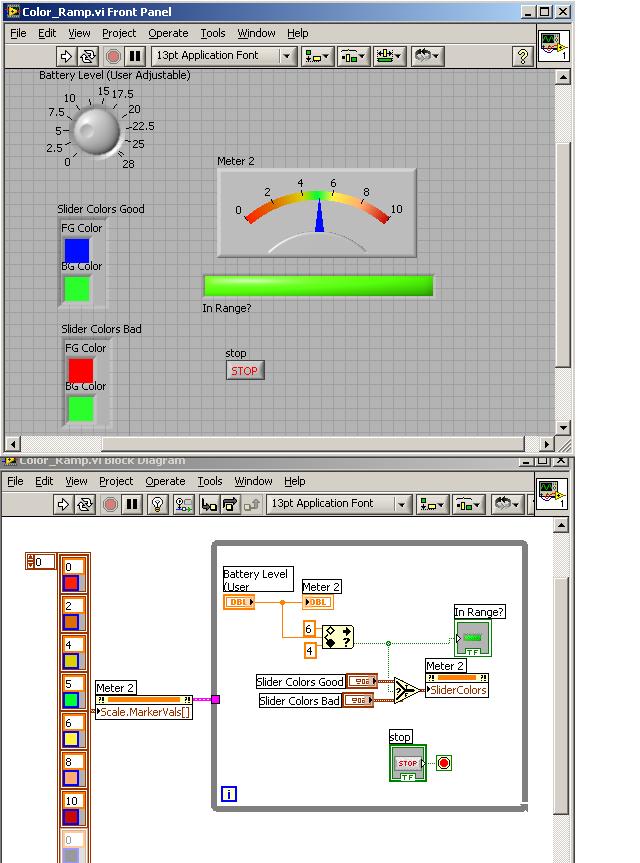
Ben
Retired Senior Automation Systems Architect with Data Science Automation LabVIEW Champion Knight of NI and Prepper LinkedIn Profile YouTube Channel
