- Subscribe to RSS Feed
- Mark Topic as New
- Mark Topic as Read
- Float this Topic for Current User
- Bookmark
- Subscribe
- Mute
- Printer Friendly Page
LabVIEW: The VI is not executable. Most likely the VI is broken or one of its subVIs cannot be located. Open the VI in LabVIEW using File>>Open and verify that it is runnable.
Solved!
 Phil_T.
10-25-2011 04:34 PM
- Mark as New
- Bookmark
- Subscribe
- Mute
- Subscribe to RSS Feed
- Permalink
- Report to a Moderator
When trying to run a sequence on a deployment machine I get this error. When I switch the Adaptor back to the Development System the problem goes away however I do not have the luxury of keeping the full Labview development on the test machine. Is there a know fix for this problem and what is the cause of this error. Here is the software and versions I am using. It seems that the vi's that are broken are using Invoke and Property Nodes within them, I am not sure if this is just a coincidence. It appears it is more related to the invoke node than the property node. Any help is greatly appreciated. Why does it seem everything works great until you try and deploy it on a test machine. This is not the first time I have had these kinds of problems using Nation Instruments software.
Labview 8.2.1
TestStand 4.0
Solved! Go to Solution.

 RayFarmer
10-26-2011 02:01 AM
- Mark as New
- Bookmark
- Subscribe
- Mute
- Subscribe to RSS Feed
- Permalink
- Report to a Moderator
Do you have Open VI Reference functions and is the VI Path parameter still correct on the Deployed system.
Ray Farmer

10-26-2011 07:31 AM
- Mark as New
- Bookmark
- Subscribe
- Mute
- Subscribe to RSS Feed
- Permalink
- Report to a Moderator
I do not have an open vi reference in the broken vi rather I am passing in a reference from TestStand that is set to default value. As far as the deployed machine, its directory structure is an exact copy of the development machine. The TestStand Sequence ran fine on the deployed machine until the Labview evaluation expired.
RayFarmer
10-26-2011 08:11 AM
- Mark as New
- Bookmark
- Subscribe
- Mute
- Subscribe to RSS Feed
- Permalink
- Report to a Moderator
I thought you were using the LabVIEW adapter set to LabVIEW RTE!!
Ray Farmer

 Trey_C
10-26-2011 02:45 PM
- Mark as New
- Bookmark
- Subscribe
- Mute
- Subscribe to RSS Feed
- Permalink
- Report to a Moderator
Hi Phil,
It sounds like your sequence is set to use the LabVIEW Development System instead of the Run-Time Engine or possibly that the run-time engine was uninstalled on your test machine after your trial version of LabVIEW expired.
You can change whether TestStand uses the Run-Time Engine or the Development System in the LabVIEW Adapter Configuration. This can be found by going to Configure » Adapters then select LabVIEW and click Configure. This will bring up the following window where you can select how TestStand uses LabVIEW.
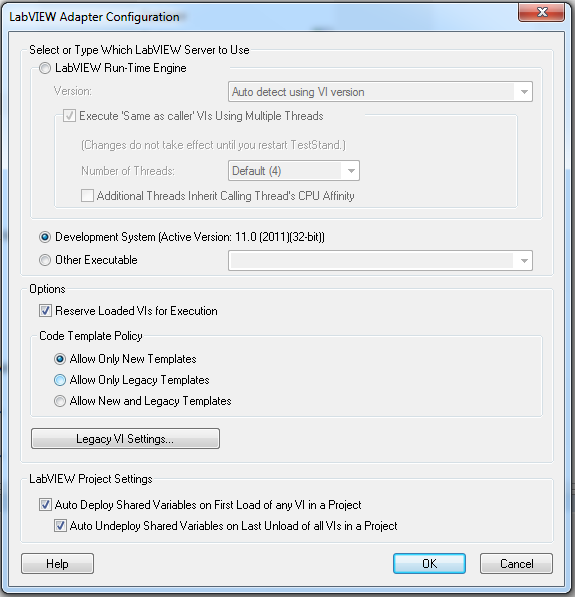
You might also find this article helpful as it provides a lot of detail for deploying LabVIEW Code with TestStand.
If you are missing the run-time engine then you can download this from LabVIEW Run-Time Engine Drivers.
Good luck with your project!
Regards,
Trey C.
10-26-2011 03:10 PM
- Mark as New
- Bookmark
- Subscribe
- Mute
- Subscribe to RSS Feed
- Permalink
- Report to a Moderator
I have set the Labview Adapter to the appropriate Labview Runtime Engine. Upon further investigation I have found the following library to be the cause of my problem. I have a library NIReport.llb which is located in several places, In my Labview 7.1 and Labview 8.2 directory. I have a vi which uses the following subvi's from the report.llb
NewReport.vi
Append File to Report
Print Report
Dispose Report
these subvis are located in my Labview 8.2/vi.lib/utility. If I remove them from my vi then the problem goes away. Attached is a picture of my TestStand Adapter configuration.
 Trey_C
10-27-2011 10:35 AM
- Mark as New
- Bookmark
- Subscribe
- Mute
- Subscribe to RSS Feed
- Permalink
- Report to a Moderator
Phil,
Was this VI originally built in LabVIEW 7.1 (or any version different than the run-time engine you are trying to use)? If it was then it is likely the case that your VI is still referencing the report generation VIs from 7.1 instead of 8.2. This would work in the full development system because LabVIEW is backwards compatible; however, when you switch to the run-time engine, you must have the same version throughout your project. In order to remedy this you could do one of two things:
1. Remove these VIs in LabVIEW 8.2 and add them back from the functions palette (you can open up these VIs and look under properties to ensure the file path is pointing to the 8.2 version of these VIs)
2. Mass compile your entire project which will update all of your VIs to 8.2.
Since you know which VIs are causing the problem and it seems to be isolated to the report generation VIs, I would probably suggest option 1.
Regards,
Trey C.
10-27-2011 11:09 AM
- Mark as New
- Bookmark
- Subscribe
- Mute
- Subscribe to RSS Feed
- Permalink
- Report to a Moderator
I have solved the problem. I had a couple of files with the same name stored in 2 seperate locations in the Labview 8.2/vi.lib one was found in vil.lib/printing and the other was found in the vi.lib/addons/vi.lib/printing. I am not sure how this was duplicated but since I removed the vi.lib folder in the addons directory there are no more problems.
 Hoss183
06-25-2012 06:17 AM
- Mark as New
- Bookmark
- Subscribe
- Mute
- Subscribe to RSS Feed
- Permalink
- Report to a Moderator
I have a similar problem.
A bit of background - I had developed a test suite with a Labview front panel for manual operations, and a Teststand project which used some of the same lower level vi's, and specific test step vi's. It was developed on LV 2010 32-bit and Teststand 2010. All was fine.
Recently i had to rebuild my development machine and installed only LV 64-bit 2011 and the latest (2010) Teststand from the 2012 Dev Suite.
I knew that i wanted to run some new hardware drivers in 64-bit versions due to another problem, so i replaced the .dll in the very lowest level VI with the 64 bit version. And ran the manual interface. All ok.
But when i try the Teststand execution, i get one of two errors:
- If i set Teststand to use the LV runtime engine 11.0.1 (2011 SP1), the i get a "Unable to load VI xxxxx with the runtime engine version '11.0'" Despite the fact that each VI does run correctly in LV dev when loaded individually, and i've saved them as version 11.
- If i set it to use the development system (which shows in the config menu 'active version:32-bit' even though 32-bit LV is not installed), then i get the "The VI is not executable. Most likely the VI is broken or one of its subVIs cannot be located." error, even though i when i open each VI in the LV 2011 it runs ok.
Any ideas?
How can i set TS dev system to use the 64-bit version? Or is there a separate 64-bit deployemrnt of TS?

06-26-2012 06:49 PM
- Mark as New
- Bookmark
- Subscribe
- Mute
- Subscribe to RSS Feed
- Permalink
- Report to a Moderator
Hello Hoss,
What you are experiencing is a compatibility issue between TestStand, a 32bit application, calling a 64bit process.
Take a look at the following articles that cover this issue:
- TestStand Compatibility With 64-Bit LabVIEW Versions
- Can TestStand Call 64-Bit Code Modules?

