NI Home
Cart Cart | Help
Hello Events Academic NI Developer Zone Support Solutions Products & Services Contact NI MyNI
You are here: 
NI Home > NI Developer Zone > NI Discussion Forums


Announcements
The NI Idea Exchange is a product feedback forum where NI R&D and users work together to submit ideas, collaborate on their development, and vote for the ones they like best. View all of the NI Idea Exchanges to post an idea or add your opinion on an existing one today!
Jeff-P

Clicking on the connector pane should make hidden controls partially visible

Status: Duplicate
by Active Participant Jeff-P on ‎05-02-2012 05:02 PM

When doing UI work, it can be quite frustrating rewiring hidden controls to the connector pane. You have to go to the block diagram -> Show Control -> go to front panel and wire it up then hide your control again.


I have seen a number of ideas proposing ideas such as hidden controls always being visible in edit mode or being able to link block diagram controls to the connector pane which I agree with and would also solve this.


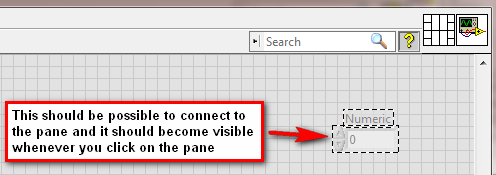
My suggestion is that when you select the Wiring Tool on the front panel or click on the connector pane (to wire up a terminal) all the hidden controls would become partially visible and become connectable to the connector pane.

1.png

Comments
by Member Wart on ‎05-03-2012 09:50 AM

This is the worst when you inherent code with lots of hidden controls and a connector pane with too many terminals.  I'd go one step farther and add that you should be able to right click on a terminal on the connector pane and either center on the front panel control/indicator or the terminal on the block diagram.  Sometimes tracking on of these down can be almost impossible.

by Trusted Enthusiast on ‎05-04-2012 10:54 AM

I'm going to close this as a duplicate because the other very highly rated idea exists and work already being done to investigate that would negate the need for this. If the other idea were not a high kudos idea, I'd leave this open.

by Member Tori_W on ‎05-04-2012 02:44 PM
Latest LabVIEW Idea Exchange Blog Posts
About LabVIEW Idea Exchange

Have a LabVIEW Idea?

  1. Browse by label or search in the LabVIEW Idea Exchange to see if your idea has previously been submitted. If your idea exists be sure to vote for the idea by giving it kudos to indicate your approval!
  2. If your idea has not been submitted click Post New Idea to submit a product idea to the LabVIEW Idea Exchange. Be sure to submit a separate post for each idea.
  3. Watch as the community gives your idea kudos and adds their input.
  4. As NI R&D considers the idea, they will change the idea status.
  5. Give kudos to other ideas that you would like to see in a future version of LabVIEW!
Idea Statuses
Top Kudoed Authors
User Kudos Count
147
81
71
56
45
By using this web site, you accept the Terms of Use for this web site. Please read these Terms of Use carefully before using any part of this site. Please go here for information on ni.com's copyright infringement policy.
My Profile | Privacy | Legal | Contact NI © 2011 National Instruments Corporation. All rights reserved.    |    E-Mail this Page E-Mail this Page